I’ve been silent on this blog recently. At least compared to my historical pace of publishing posts.
One explanation is that I’ve started writing my Perspectives on Power Platform newsletter. If you’ve been follwing my blog for the technology topics around MS BizApps, I recommend you to check out perspectives.plus and subscribe to receive the newsletter issues via email. (Why use a newsletter instead of a blog? That’s a subject for a future post to come.)
Silencing your employees
There are other types of silence. The one that got me reflecting on these thoughts is what has been written about the NDAs at OpenAI. In short, the organization has imposed very strict contractual terms on departing employees. The exceptional issue appears to be OpenAI claiming the right to claw back vested equity. This right would be triggered if the ex-employee would criticize their former employer – ever. With no end date.
Reading about these reported policies has caused me actual physical discomfort. There is just something about the pre-emptive silencing of the people who work at an organization that rubs me the wrong way, in a big way. Can there be a more obvious way to state “we won’t really ever trust you”than imposing something like this?
In this case, the executives have of course played the get-out-of-jail card of unawareness. From the Xeet of Sam Altman:
there was a provision about potential equity cancellation in our previous exit docs; although we never clawed anything back, it should never have been something we had in any documents or communication. this is on me and one of the few times i’ve been genuinely embarrassed running openai; i did not know this was happening and i should have.
Sam Altman, CEO of OpenAI
Many will surely believe the explanation. That it has simply been some lawyers out there who’ve been zealously protecting and pursuing the client’s legitimate interests, within the bounds of the law. The corporate way: we’re doing all this just because it’s the way corporations work.
Weapons of mass distrust
The fact that OpenAI has never clawed back money from ex-employees is completely irrelevant. The impact of such contract clauses takes place regardless. The whole purpose of nondisclosure agreements is to stop something from happening. They are the corporation’s nuclear missiles.
While there are perfectly legitimate scenarios in various business relationships where NDAs enable confidential discussions to take place (everywhere in consulting, for example), this one is very different. When you have a policy that forbids criticizing the company for the duration of the former employee’s lifetime (and also forbids them from acknowledging the existence of the NDA), this is not about establishing trust. It is a weapon against another party that you by default do not trust. Period.
This model establishes a system of silence. Both before and after an employee leaves the organization. This is because it’s important to understand how the concept of criticism is defined. It is not something that the employee (subject) can evaluate. It is unilaterally defined by the corporation (object).
From this situation arises the imbalance of power that can impact organizations in everything they do. If your employees must be continuously evaluating in their heads the question “could someone interpret what I’ve said as criticism”, they will only say out loud a small subset of what they really think. Self-censorship is a destructive pattern that can repress any initiatives for building trust among teams.
As the information worker organizations increasingly become independent from physical locations, our communications start to become mostly digital. No matter if its emails, chat messages, online meetings – our modern multimodal AI algorithms will convert everything into text. Potentially storing it forever. Making it available for queries, in a whole different context than where the communication initially took place.
In such an environment, where do you create room for the informal, uncensored discussions to take place? This is a very hard problem to solve in practice. That’s because the root cause isn’t the traceability of digital communications. The need for creating a separate space where people can express their thoughts and feelings is the problem. Such separation should not be needed to begin with.
Choosing transparency
Ever since the Web 2.0 era tools and techniques became available, I’ve been a vocal proponent of working out loud. The idea that you should be proactively making your work visible to the networks through which value can eventually be created. Not just reactively providing specific information when requested. Making everything you type as broadly visible as possible in the given context.
Blogging is a communication pattern that optimizes for the amount of awareness and influence that each keystroke can possibly yield. Some topics, of course, are necessarily private and interpersonal. But a surprising amount of business communication is potentially broader in scope. If your choice is to invest keystrokes in an email to three people, or in a blog entry that could be read by those same three people plus more — maybe many more — why not choose the latter? Why not make each keystroke work as hard as it can?
Jon Udell: “Too busy to blog? Count your keystrokes.”
For someone like me who believes in the transformative power of radical transparency, any organizational barriers that encourage silence are a problem. Most of them are softer barriers, such as the general convention of how people around you behave. Others are technical barriers that results from the design of our information systems – be it intentional restrictions or unintended practical limitations. Finally, there are the contractual weapons mentioned earlier.
I don’t believe there is a way to separate external transparency and internal transparency when it comes to company culture. By external I’m referring to communication that takes place out there in open communities and networks that connect professionals from several different organizations. The internal part is about all communication that takes place within the (fire)walls of an organization – voluntarily, without an explicit process to require such activities to take place.
If internal transparency is not something that is organically allowed and encouraged to grow in the organization, you’ll likely have to try and force the external transparency. Meaning, it’s hard to get your experts to actively participate in community activities and share their knowledge with the outside world if it’s not a pattern that exists internally in the corporation. There will always be exceptional individuals, but it will not become a part of your culture. Thus you cannot leverage the network effects but rather have to pay to get people to notice your company.
The excuses for silence
Transparency can be a virtuous cycle for the business. Silence is often a vicious cycle. Why isn’t every organization then gravitating towards a more open and trusted culture of communication? Boy, that’s a big question that requires some serious investigation. Or maybe just throwing a quick question at ChatGPT – which provides the following reasons:
Fear of negative exposure
Control and power dynamics
Short-term focus
Lack of trust in employees
Cultural and structural barriers
Legal and regulatory concerns
Inertia and status quo
Risk aversion
Going through the list and the more detailed explanations under each item (try it with your AI tool of choice), it’s easy to see why choosing transparency isn’t by any means easy for organizations. Individuals exist also in the leadership team, thus the choices made in managing a company aren’t made simply based on cold, hard logic. We all need to feel psychologically safe at work, among our colleagues as well as with our managers/subordinates. If we’re emotionally or physically drained, that sense of safety is really difficult to reach. And so the cycle begins.
Transparency rarely just happens, yet silence is easy to achieve. Like in the example from OpenAI. The fact that the word “open” is included in the company name has been the source of ridicule for many reasons (closed source models, lack of respect for copyrights). Even though they’ve got the technical and financial resources in place to achieve top results in the global AI race (largely thanks to Microsoft), the company’s culture of silence can turn out to be a significant handicap in the long run. It’s certainly not a place for everyone to feel safe at.
How you treat the employees who are moving on is a signal of whether you consider them to be a potential future asset or a liability. As the detailed report from Vox.com reveals, there’s not question what side OpenAI’s culture falls on:
“We want to make sure you understand that if you don’t sign, it could impact your equity. That’s true for everyone, and we’re just doing things by the book.”
Email from OpenAI to an employee asking for more time to review the employment termination agreement.
“Just doing things by the book.” Just assuming that whatever the employees do in their professional lives from here on could not possibly be of value to the organization. As opposed to the clear and present risk of them talking with others and expressing their own thoughts. Talk about short-term focus in a networked world.
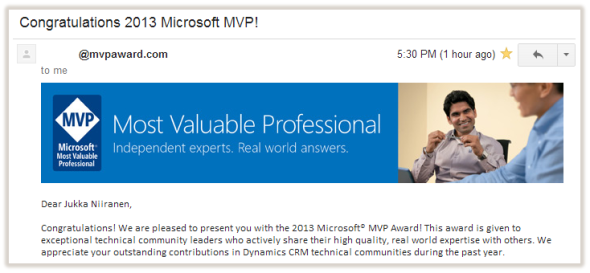
Way back in July 2013, I received the email that informed me I had been presented with the Microsoft MVP award:
Almost exactly 10 years later, in July 2023, I received that annual email from Microsoft for the eleventh time. It was once again a special moment. To be honest, every year that MVP award renewal day has been a special day filled with excitement.
Yet this time it was a bit different. I knew this would be the last time I will get the renewal email. Because I had made the decision at the start of this year that my journey in the MVP program is coming to an end.
First of all: no, I’m not joining Microsoft as an employee. For those who keep track, that has been the most obvious explanation over the years for voluntary exits from the program – with MVPs trading their blue sticker for a blue badge to become FTEs.
What’s my reason then? Well, the extremely short version of it is: today I am getting less from it all than what it is giving me in return. It no longer makes sense for me to try and be a Microsoft Most Valuable Professional.
There is obviously a lot more to it. I’ll talk a bit about it in this post and possibly return back to the specific topics at a later date. Also: since the awards are for an annual period, I want to remind you all that my current MVP award is still valid until the end of June 2024. By giving an early notice, I believe things will work out the best.
Unlimited opportunities
I want to start by stating this: being a Microsoft MVP has been an amazing ride. Beyond what I could have imagined. I have zero regrets for signing up to it a decade ago. It was at that time a very logical progression of what I was doing as a member of the community. Checking back on my own blog post about receiving the first MVP award, I still believe in the same things I believed at that time:
The virtuous cycle of communities is truly a powerful force. In exchange for receiving help from complete strangers with no expectation of monetary remuneration, you start to feel compelled to give back to them in one form or another, to pay it forward. Once you do, you begin to notice that there are others who in turn are benefiting from your actions, which makes the cycle just start to spin faster & faster.
Jukka Niiranen, fist day as Microsoft MVP, 2013
Getting a formal network established not just with the Microsoft product team but also (and most importantly) the fellow MVPs who are deeply passionate about the same technology as you are – that really is quite something. It introduces you to this secret world filled with detailed knowledge about every possible corner of the technology you specialize in.
You gain a wealth of new perspective on things by being part of such a network. It’s not only about learning something new – it’s also about validating that others feel the same way you do. That no matter how big the projects and budgets may be somewhere out there, people still suffer from similar issues as you do. Your reality is also the reality of many others out there. And most importantly: what you’ve personally learned about a specific corner of the product can be of considerable value to everyone else in this ecosystem.
While the MVPs tend to be highly knowledgeable in their own domains, we must remember that the MVP award is not given out based on how much you know. It is awarded to those persons who are most active in sharing with others what they know. There’s no value to the community in what you yourself learn unless you’re willing and motivated to help others learn it as well – and without any direct financial compensation.
This model doesn’t always work well with the traditional mindset of consulting organizations where information itself is seen as the source of value – something you need to charge money for. For me, as a person with deep beliefs in the idea of working out loud and how that benefits both organizations an society as a whole, there was never a conflict here. I didn’t start blogging and tweeting because I wanted to achieve some award status. I did it because there was intrinsic value in it for me. It was (and still is) the most natural way for me as a professional to achieve great results at work. The rest is just a nice bonus.
Becoming a member of the club with the blue MVP logos on their blogs made it more straightforward to explain what I am & what I do. It accelerated the growth of network connections within the MS BizApps ecosystem. I hardly ever actively leveraged it myself, instead I relied on the “inbound marketing” approach of waiting for people to reach out to me. There were more than enough opportunities coming in that way for community engagements in different formats. I no longer needed to maintain my CV for work gigs either.
The limits to growth
Passion is something to cherish, but how do you separate it from addiction? When there is an endless source of interesting topics to explore in your professional field AND you also have amazing networks at your disposal for getting deep insights about them all – passion can become dangerous to your mental health. Especially when the boundaries are blurred in a way that makes it impossible for you to see where they used to be drawn. You may gradually forget how the world looks like outside this bubble.
I’m sure many of the readers of my blog experience the difficulty of separating work time and personal time. If you are consuming tech blog content like this instead of just googling for answers to specific problems (or today using ChatGPT / Copilot to get the solution), chances are you’re invested in solving problems with technology far beyond what your current day job would require. You go the extra mile – again and again.
We should of course be grateful about our situation. I honestly cannot imagine what life would be like if I had to work in a 9-5 job doing tasks that I stop caring about once the working day ends. It is a privilege that not too many people on this planet have. Even if it would so happen that AI comes for our jobs first and takes over the cognitive work that evolution had far too little time to prepare our brains for, I’m truly happy that this opportunity existed in my lifetime.
The real danger isn’t AI, though. It is us. With nothing physical in the world setting the boundaries for how and where we can engage in this work related cognitive activity, our reptilian brain may end up on the driver’s seat far too often. External stimuli from the pervasive, growing and ever present information networks we’ve surround ourselves with to find the answers to our day-to-day questions can end up teaching us to always crave for more interactions. We get hooked on the process itself, instead of applying these tools to achieve desirable outcomes.
The Microsoft MVP award can certainly be one outcome that many aspire to achieve based on the investments they’ve made to the community work. Yet the dangerous part is in how that is achieved. Because it is all about quantifying the impact of your community contributions. What does that mean in practice? In short, you need to keep track of all the various activities that you as an individual perform in the chosen area of expertise and then provide as much measurements about them as technically possible. Posts, videos, books, speaking, mentoring, facilitating, arranging, participating, amplifying… It all becomes a number in a system that tracks your performance.
If that sounds a lot like typical work KPIs – you’re spot on. Except it’s a measurement performed by someone who doesn’t give you any money in return. All you get is the aforementioned email from Microsoft once a year that lets you know whether you passed the bar or not. Plus a glass disc to insert into your award trophy. And that’s all the tangible things you get. Period. (You used to get physical stickers and diplomas, too, but starting from 2023 those have been cut away from the MVP program. As for swag, it never was a formal thing. So, the ecological footprint of the award has largely been about travel.)
It’s all voluntary, of course. Since no financial transactions ever take place between the MVP & Microsoft, technically it’s all fun and games. Every year in July the award renewal email either comes or it doesn’t. You can never be sure about whether you’ve performed enough activities to be kept in the program for another year. That’s because it’s a very asymmetric relationship. Microsoft will ask all the details from you about what you’ve done, yet they won’t ever disclose how much you should have done in their eyes.
I don’t want to complain about the system too much, though. I can totally understand why it is built this way, with no predefined criteria to meet. It is completely different from taking a certification exam, for example. For reasons that are beyond the scope of this post, there is a finite number of MVPs that can be awarded in a given year. Furthermore, there are as many different individual ways to contribute to the community as there are MVPs out there. There could never be a publicly visible “passing score” for something like this.
That’s the system, but what’s the impact to our lives as Microsoft MVPs then? In practice, we start to live under a self imposed surveillance system. Like it or not, the awareness of a scoring process that will evaluate your performance in the community on an annual basis will change what you think and do. Community contributions become a virtual currency in the style of NFTs, in the sense that they only really have monetary value to yourself.
The positive side is that for people who crave for speaking engagements, podcast invitations and all the other activities – there will be more than enough opportunities for those. You can contribute practically in unlimited ways in today’s combination of physical and virtual worlds. Yet the one pressing question remains: if there could always be more, how do we ever know what is enough?
During the past 3-4 years, I have personally reached my limits to growth. I am intentionally referring to the title of the 1972 study of what happens with exponential economic and population growth with finite supply of resources available to us on planet Earth. It’s all about that one flaw in the thinking that we the people tend to fall for. We ignore the long-term consequences of our actions and focus only on the short-term benefits – and set our targets accordingly. We think “more is better” and thus keep striving for more, even after the net impact from all of it turns negative.
Then finally, we’re forced to deal with the consequences of our own actions. We have to choose, not just strive for more.
Choose life
For a few years now I’ve had the constant feeling that something in my life is not quite right. As if I was an outsider observing myself going through a path that has been laid out in front of me. While there have been several moments of joy along that path, increasingly I’ve found myself not truly looking forward to anything. All I do is aiming to get through the day, so that another day filled with the same exact feeling may begin.
In many ways, I have it all. Yet I’ve never felt as empty inside as right now. As I’ve come to understand my own reality better through reflecting on what exactly it is that I do here in this job position called “life”, the problem has become obvious. My responsibilities in here fall under these areas, in no particular order:
Co-founder and Power Platform Advisor
Father and husband
Microsoft MVP and community activist
Between those three main roles that have filled my life, there has been precious little room for anything else. These have been the modes in which I have operated 24/7/365. Unless something out of the ordinary happens. Yet when planning for things that I could be doing when nothing has yet been booked, the obvious list of To Do’s that comes to my mind is always from one of the three.
The fundamental issue is: I can’t find myself in there. At which point do I begin to exist? Not as someone who is acting in a predefined role, together with other actors, to do something expected from that role. Rather as just a human being on this planet. Just me.
For a long time I have not been able to find a satisfactory answer to that question. It has literally turned into an existential threat for myself. I have suffered from recurring waves of paralyzing exhaustion that has severely impacted both my personal and professional lives. Not only have I become tired – tiredness has become a part of me.
Through writing down my own thoughts in a personal journal throughout the past 4 years, I’ve been able to reflect on the many conflicts I’ve encountered via the changes in my life. How becoming a parent has flipped the meaning of “home” on its head (from a private safe space to a nest for your family members). How being an entrepreneur still doesn’t help in assigning measurable monetary value on time spent in community activities as opposed to customer work. Forces that have been ripping me in opposite directions, spreading it all too thin. Some of these conflicts have been surprises, others I’ve totally been expecting to encounter.
Just because you can see it coming, doesn’t mean you can stop it. That applies to the deep exhaustion that has taken over me. At the time of writing this blog post, I have been on sick leave from work for several weeks, trying to regain the mental and physical strength to again perform as a normal human being out there in the world. I have probably been holding all this back for an extended period of time, not allowing myself to stop. It’s never a good time for something like this, yet I’m glad that it now became possible to take a break. Or more precisely: to break down.
It’s hard to change the state you are in merely by thinking differently. Knowing is not the same as doing. Therefore, it has been an enlightening experience to be able to temporarily alter my everyday routines during the sick leave. On quiet weekday mornings, instead of powering up the PC and starting the working day filled with processing & responding to the many data streams that form my professional reality – I’ve done nothing. Literally I’ve just stayed on the couch, read the newspaper, listened to music, enjoyed my coffee, browsed non-work forums, opened up a book – and not had anything else on the agenda for many hours. “Doing nothing” has been an option in life that I’ve forgotten the existence of – when it comes to myself.
Often one makes room in his life to get something done. With the aforementioned unlimited opportunities of an MVP, all the empty spaces can easily become filled with the hazardous fluids of productivity. Earlier when I have been resting, it has typically been for the purpose of recharging my battery, so that I carry on. The major difference in what I’ve now been able to experience is: there is no “so that” part. Resting because you are tired and allowing yourself to be just that, in this very moment, seems to be what it actually takes to achieve calm.
Living in a constant state of alertness has done quite a bit of damage to myself, with no ability to properly calm down and free myself from stress on a regular basis. There is no one specific cause for this, nor is it exclusive to one area of my life. It’s the result from the entirety of it all. I don’t know when or if I will recover from it. What I do know is that this same quotation applies to my situation now, just like 4 years ago when I used it to announce my farewell to CRM:
If you want something new, you have to stop doing something old.
Peter Drucker
Life after MVP
In the end, the choice has been simple to make when put into the greater context. Of the three roles that cover the majority of my waking hours, the one that I can easily let go of is the demands of an organization that I don’t contractually work for. I don’t have any true need to meet the bar for community contributions required to be renewed as a Microsoft MVP. I can stop thinking about it and gradually free up the mental space occupied by this hugely rewarding yet highly demanding activity. It represents my past self that must now make way for my new self to emerge.
I do acknowledge that I’ve worn the MVP hat for quite some time and many of the readers of my blog will not have known any other Jukka. I remain grateful every day for the opportunity of sharing my thoughts with a community of likeminded professionals in the Power Platform ecosystem – and that someone actually pays attention to what I have to say, occasionally even replying back to me. I intend to cherish this and not disappear from this virtual space we all share. I just won’t think about chasing MVP contribution points, rather I’ll only do what feels natural for myself.
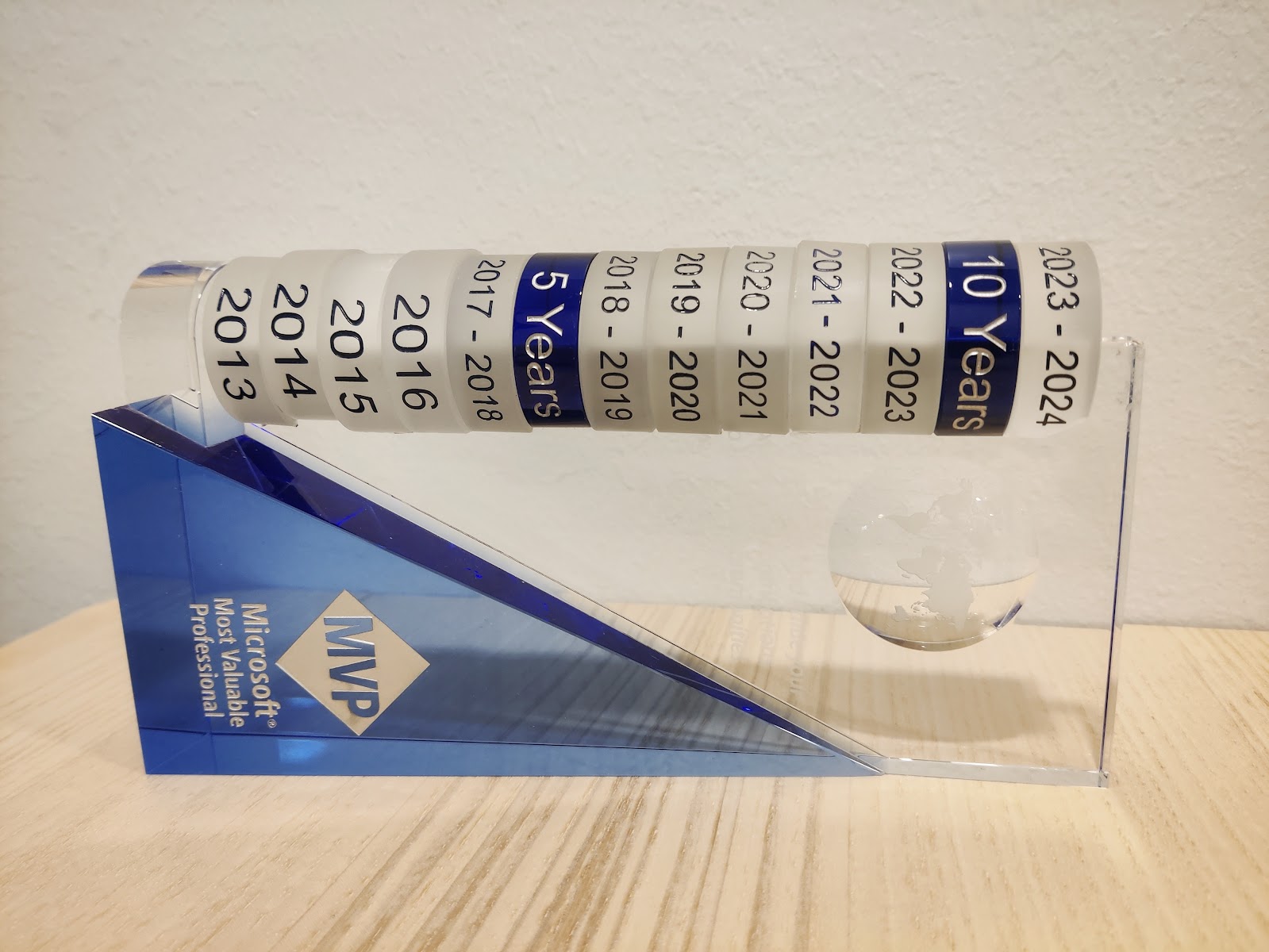
Will I suddenly become a “Formerly Valuable Professional” / “FVP” then? I’m pretty sure my technical skills and ability to help others won’t immediately evaporate as part of this announcement. After all, thousands of highly skilled community contributors before me have had their Microsoft MVP award not renewed, so it’s really just business as usual in this sport. Whatever it was that earned me the last 2023-2024 MVP disc on my award trophy was something I did between April 2022 and March 2023. In every league the season always starts from zero points for all the participants, with new faces entering the game as the senior players make way for them.
I’m convinced that in the end this will be better for me. It will also be better for the people I work with. It will absolutely be better for the people I live with. Somehow I also believe that this is going to eventually be a positive change for the many community members out there who read what I type into text boxes on the internet.
Some things will change. Possibly the content of this blog will also evolve a bit. Yet I’ve been blogging here for 15 years now and I have zero plans on stopping that. If anything, I want to reach a state where the act of expressing my thoughts becomes once again a source of energy for myself – rather than something I need to do to secure the blue sticker.
Which reminds me that I’ve got some scrubbing to do before next July – in both physical and virtual stickers…
I have been blogging quite a while in terms of calendar time. One year ago I did some math on how much time has been spent on the blogging activity itself. This data can be found in my post “Is blogging worth it?”
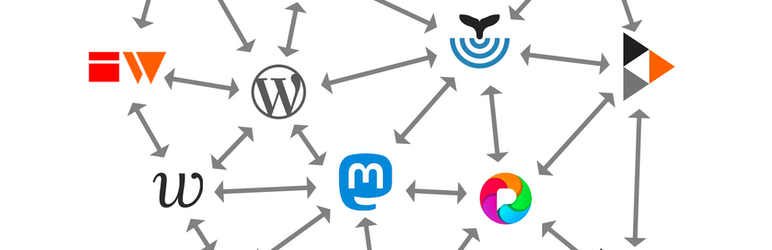
The online world around me has gone through many waves of changes. The most recent one involves the term you see in this post title, which may or may not be familiar to you. I certainly didn’t know about it a year ago. Today, I am making (or at least attempting to make) my first WordPress blog post that goes out into the Fediverse via ActivityPub!
To put things into context and explain what & why I’m doing, let’s look back a bit on the road that lead to the rise of the Fediverse.
Humble beginnings
I started my first blog over on Blogspot sometime in 2007. That blog doesn’t exist anymore, yet recently Google reminded me of the image files they’re still hosting related to that blogging activity. Including this wonderful photo of the actual corner in my bedroom from where it all began:
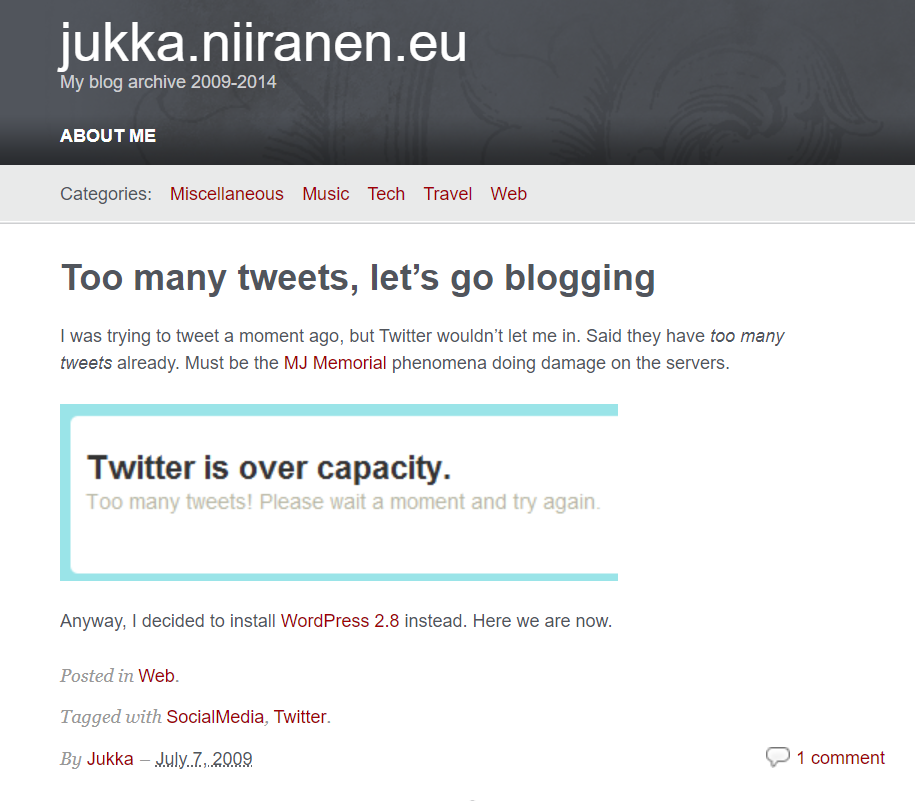
After I found the Blogspot cloud service too limited, I decided to go on-prem and install a version of Drupal on a hosted server somewhere. That site doesn’t exist anymore either (at least I hope it doesn’t). In 2009 I figured Drupal wasn’t designed for my purposes and moved my personal blogging onto WordPress. That specific blog is still online and this is the first post I found on it:
That post’s content was a surprise for myself. I would not have recalled that I had originally joined Twitter for the same reason as the masses did: to follow what celebrities around the world were sharing about their life (140 characters at a time).
A bit earlier, in 2008, I had already started another WordPress blog called “Surviving CRM” which eventually evolved into the blog you are reading right now (“Thinking Forward” at jukkaniiranen.com). The core WP enginge has remained the same behind the scenes (with countless version updates, of course) and the main contents of all the blog posts is also still available.
Everything else about the blog has changed several times (pages, topics, visual theme, plugins, features, linked services), yet fundamentally it’s the same digital object that was born 15 years ago. With a few domain redirects that I put in place, you could have even started following my blog via its RSS feed back then and still today see this updated that I posted.
If someone would still be using RSS feeds, that is.
Social media boom and bust
My inspiration for starting to write blog posts naturally came from following other bloggers. The method for this was RSS (“real simple syndication”). I started trying out different feed reader software & services (like Netvibes) before Google Reader took over the feed aggregator market.
Then Google did what Google usually does, meaning killing its products. Presumably the monetization model for online media consumption based on open standards like RSS wasn’t lucrative enough compared to other ways Google could turn user data into something to sell to advertisers. When the hugely popular Google Reader was discontinued in 2013, no similar feed aggregator service took its place.
The online masses turned to social media services instead. Blog posts were no longer a dedicated feed, now they were just a part of the updates presented via the social graph of users you followed. The likes of Facebook and Twitter owned this graph and realized how much more profitable it was for them to control it – rather than just showing a chronological feed and allowing users to categorize content. Enter the age of the algorithms deciding what the users were seeing.
Today, the social media as we came to know it in the golden age of Facebook and Twitter is slowly yet surely dying. I had remained an active Twitter user for over a decade, despite of the decline in organic network content and the rise of algorithm pleasing clickbaits and political outrage filling the feed. After seeing the massive damage that Elon Musk managed to create when taking over on October 27th 2022, I decided to stop posting new content on Twitter on November 18th.
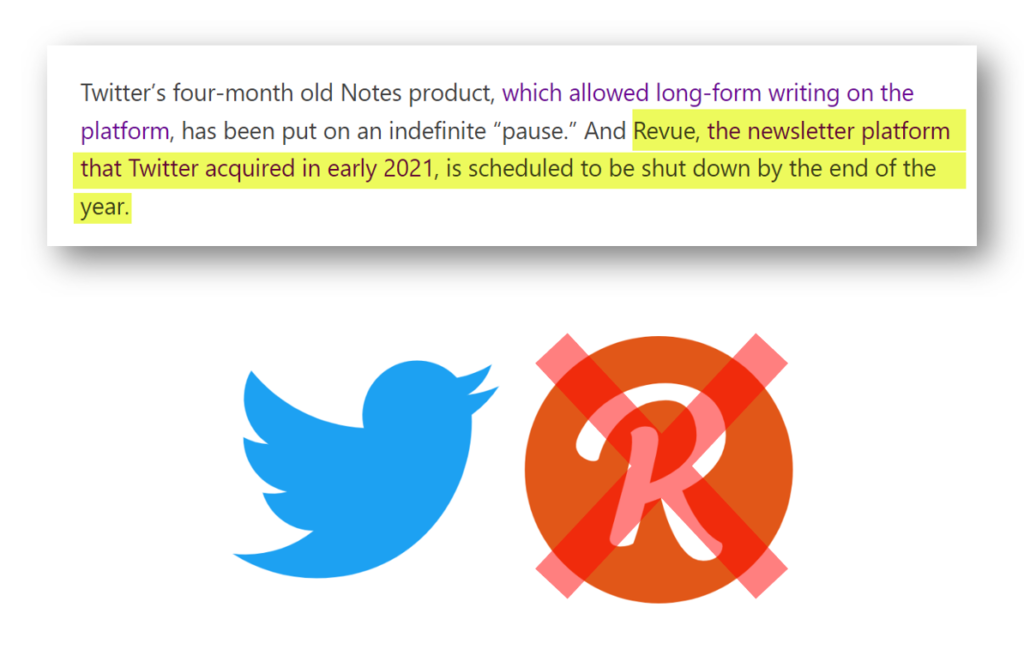
I knew that the things which had been broken in the process, primarily user trust and the sense of community, would be unlikely to ever get fixed again. To make it easier for everyone, Musk eventually decided to kill also the Twitter brand and replace it with X. That cross shape is a very fitting symbol for the graveyard where the blue bird was laid to rest.
I’m kind of happy to see this, as it draws a clear line between what Twitter was and what its new owner wants it to be. I wouldn’t want my online identity to be associated with the latter one. No, I haven’t deleted my account nor tweets, because I also don’t believe in changing the world by erasing the past. We can only move forward in this life.
What comes next?
Just like there wasn’t a new Google Reader to take over the service that was killed, I don’t believe there will be a new Twitter to take the place of what is now called X. Sure, many will be attempting to build the exact same thing, including the earlier Twitter CEO, or the established social networks like Instagram and TikTok.
“Insanity is doing the same thing over and over and expecting different results.” So what if some new mobile app comes along and captures the market share for the time that we used to spend on Twitter? The chances of history repeating are high, thanks to the natural life cycle of online platforms that leads to enshittification.
“Here is how platforms die: first, they are good to their users; then they abuse their users to make things better for their business customers; finally, they abuse those business customers to claw back all the value for themselves. Then, they die.”
The early days of blogging did not provide everyone an easy onboarding experience nor an streamlined UX for casual content consumption. Yet there was none of this shit. In exchange for all the convenience and endless dopamine shots that the global, proprietary online platforms give us, they will also serve you an ever growing daily dosage of shit on a golden plate.
At the same time, blogs haven’t technically gone anywhere. No, you’ll never have every TikTok user create their own blog. That is not the goal because there is no one to set the goals but us. If you’re like me, you never even set any goals in life to begin with.
As long as there is a sense of community being established and ideas are exchanged between people who you wish to interact with – that’s a pretty good life to live online.
Yet not everything can be a blog post. We can’t pretend to be professional journalists working for major newspapers, writing formal and polished walls of text as the only means of communicating with the outside world. The idea behind social networks isn’t fundamentally broken – only the business model that leads to their inevitable enshittification. What was once commonly called “microblogging” in the distant past has certainly proved its value in the act of idea exchange and information dissemination through peer networks.
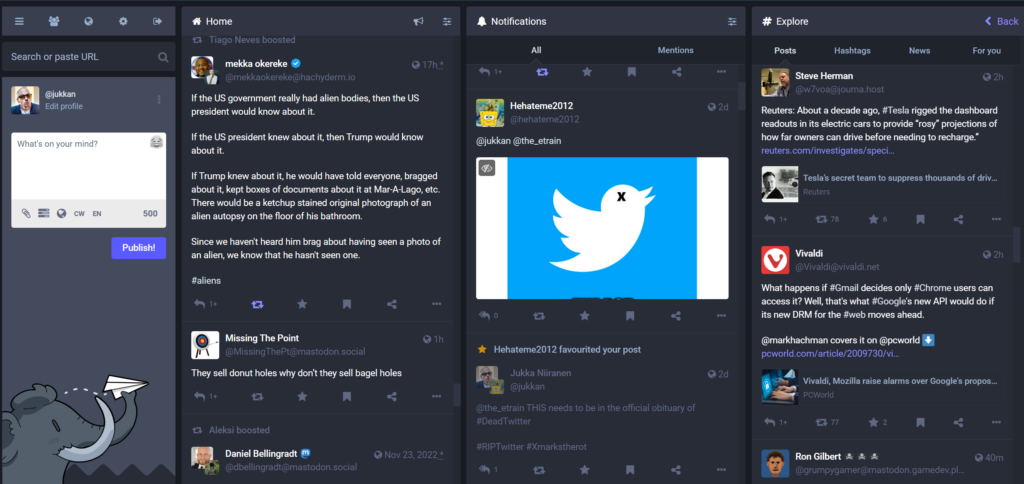
Once I realized that Twitter was over for me, there was a proper incentive to think about what other tools are there for this type of communication. I saw my network exhibit interest in Mastodon and decided to give it a go. I managed to get past the infamous “pick a server” question, created my user account, searched for other interesting accounts to follow and gradually settled in. Today, it feels like a very natural home for one of my many online identities.
Mastodon has around 2.1 million monthly active users. As such it won’t be a threat to any of the networks run by publicly listed tech giants. Also many VC funded startups in this market may well be able to burn cash for user acquisition in ways that Mastodon will have no possibility to match – by design.
In the end, it’s a decentralized social media platform that no single deranged billionaire can acquire. It’s just a bunch of regular folks running a few servers that facilitate the federation of user feed content between them. There are no ads to be found in Mastodon feeds because the whole concept does not exist in that technology. Content isn’t shown to users based on any algorithms because again, that’s not a thing in Mastodon. In both good and bad, what you follow is what you get.
Hello ActivityPub
RSS is a protocol. Twitter at some stage talked about their ambition of becoming a protocol for the internet, but quite obviously they didn’t move into that direction. Now, ActivityPub that powers Mastodon and much of the Fediverse is an official web protocol with a W3C stamp on it. It has also gained interest from commercial players like Meta and WordPress.
Protocols are cool because they are not dependent on any single organization. You can send email from your Microsoft 365 Outlook to a Gmail address and all of the core message content will be similar in both services. The UI, the features and the email experience in general can be different (especially with both MS and Google “reimagining” office applications with their own flavor of generative AI). You can innovate on product development and also the commercial model while still preserving interoperability with other services that use the same protocols.
So, if ActivityPub is the thing that allows you to both read and publish content on a social network like Mastodon, how does it relate to blogging? Is it just like Twitter you still had to tweet out the links to your new blog posts and make them visible to the followers of your Twitter profile? Well, it’s a bit different – and it’s also still very much work in progress.
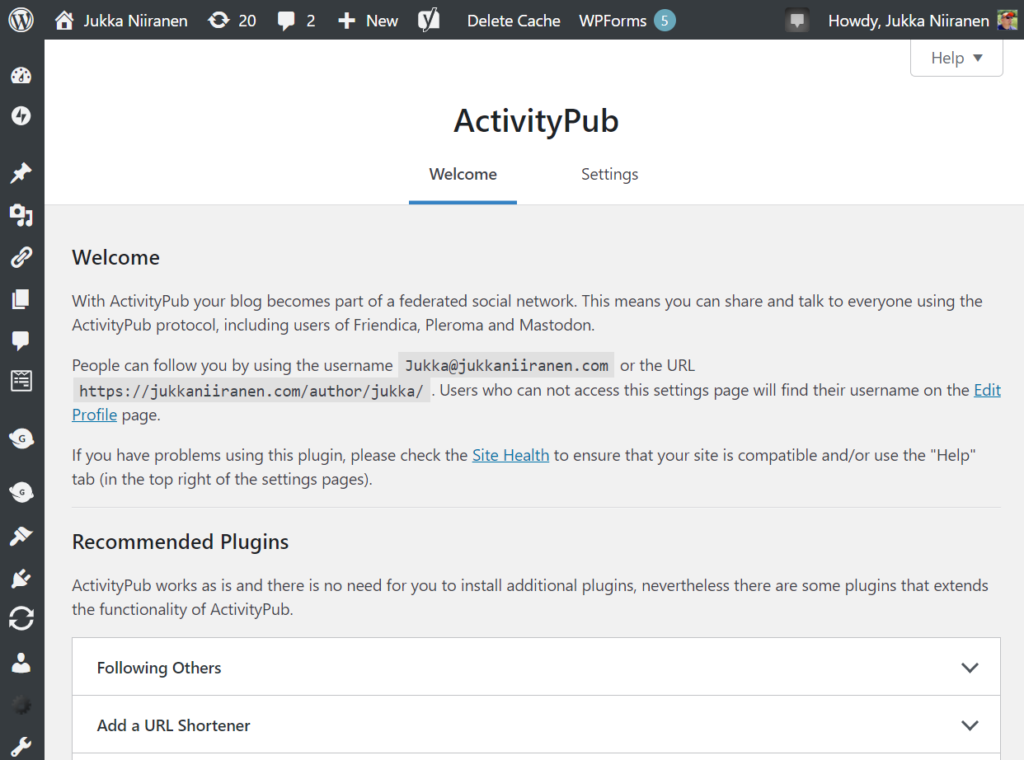
In March this year the ActivityPub WordPress plugin was acquired by Automattic, the folks behind WordPress.com (and also Tumblr). Presumably the experience will become much more integrated with WordPress in the future, but we can already deploy the ActivityPub plugin on our self-hosted WP instances. Here’s what the settings look like on the admin side for my blog:
"People can follow you by using the username Jukka@jukkaniiranen.com or the URL https://jukkaniiranen.com/author/jukka/"
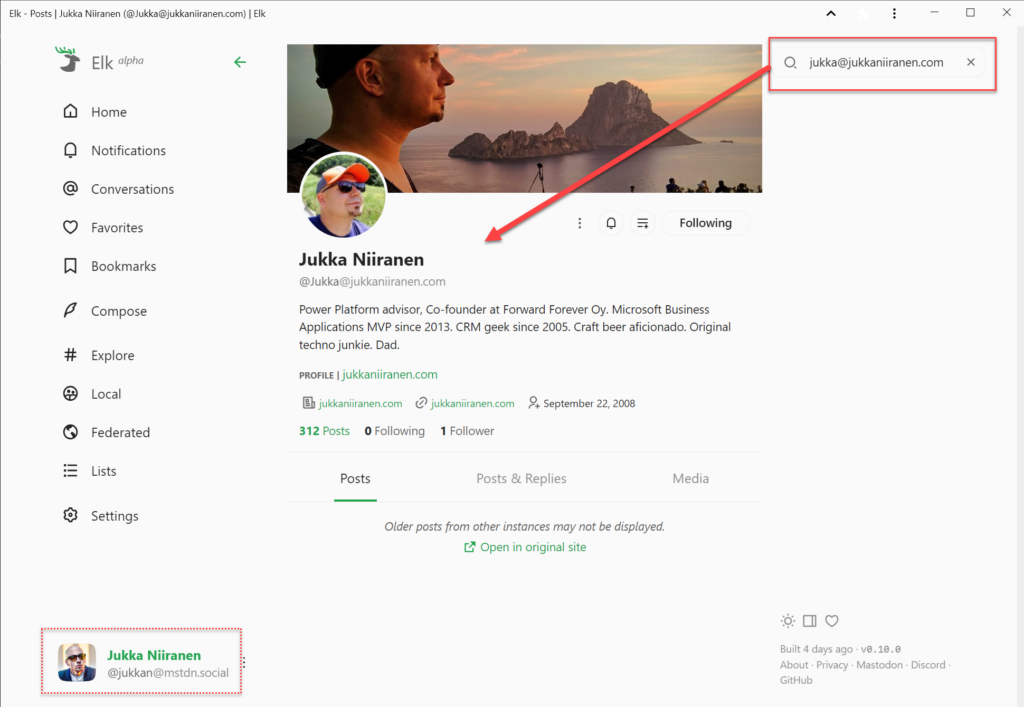
What’s that all about? It means that when using a service like Mastodon, people can find this blog by searching for “Jukka@jukkaniiranen.com”. As an example, when using the Elk web client for Mastodon and logging in with my @jukkan@mstdn.social account, I can perform this search in the app and land on a profile that represents my blog. It’s an independent thing on the Fediverse that users can follow, even if they don’t care about the rants I post on my “main” profile and just want the long-form content like this blog post.
It’s kinda cool and confusing at the same time. Which is a lot like setting up a blog was 15 years ago, or what Twitter was in 2009 when I signed up for it. That’s part of the reason why I’m excited about the recent rise of federated online services. You don’t have to be a geek to start using them, but it definitely helps.
Is ActivityPub the replacement for RSS then? I don’t quite see it that way today. However, for the majority of the current online population who have never subscribed to an RSS feed to begin with, I see a lot of potential in this new protocol to revitalize the social web. To take back control from the mega platforms that are doomed to follow the path of enshittification. To spark up new innovation in both the established web players (WordPress, Mozilla, Medium etc.) as well as make room for new projects to find an audience outside the walled gardens of X, Facebook and the likes.
Things won’t magically become better with decentralization. Sustainable business models or consumer grade UX aren’t easy to come by with no direct ad revenue. If the popularity of a decentralized service grows, many problems like content moderation or infrastructure scaling will certainly be as hard as on the centralized side. From Twitter to Mastodon, from Instagram to Pixelfed, from Reddit to Lemmy, from YouTube to PeerTube – if the same people move from one technical platform to another then so will the problems caused by people.
We should not stop moving, though. We should not accept that the one party who holds the most data (generated by the users) gets to decide on the rules. We may not be able to avoid using many closed systems with ad revenue based business models. Yet we must ensure that our content is not captive inside only such systems.
Evolution is all about competition, about having a choice. For us users of the web to have that choice, we must A) use the power of owning our content, and B) put in the effort to learn and support new tools.
The best time to start a personal blog was 15 years ago. The next best time is now. The best time to join Mastodon was before the Bird died. Today is another fine day for it. Learn about it from Fedi.tips and follow me (@jukkan@mstdn.social) and this blog (@jukka@jukkaniiranen.com) if you get there!
In this age of online commerce, and especially when selling digital subscription services, one might think that the online storefronts of large corporations would contain accurate product descriptions. Or that at least it wouldn’t take many years for incorrect information to get fixed.
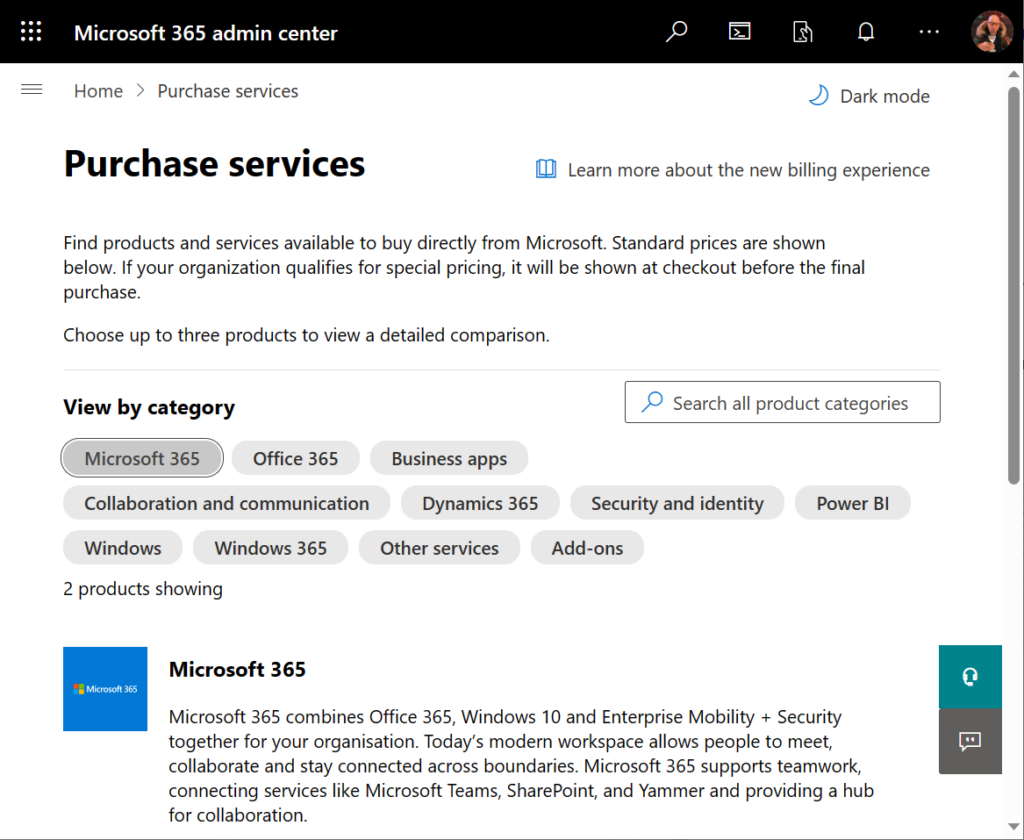
Neither of these assumptions are correct when dealing with Microsoft 365 admin center’s online store, a.k.a. the “purchase services” tab. The detailed information that is shown to customers who are looking to purchase Power Apps licenses is not valid in this portal. It hasn’t been valid for close to 4 years now.
During the past couple of years, I’ve tried every imaginable channel for contacting Microsoft about this. I’ve reached out to MS partner forums dedicated to licensing information. I’ve posted into Microsoft MVP program related forums dedicated to MS Business Applications licensing information. I’ve reached out directly to the product team who owns Power Apps.
Nothing has helped in getting this information fixed. Which means that I must assume it will never get fixed. The only way to communicate about this to the people who suffer from it (customers, partners) seems to be in writing a blog post like this.
Let’s take a look at the online commerce experience for someone who’s got a Microsoft 365 tenant and wants to purchase Power Apps licenses directly from Microsoft. In this scenario we want to specifically understand the options provided in the subscriptions called “Power Apps per user plan” and “Power Apps per app plan”.
Finding Power Apps products from Microsoft 365 admin center
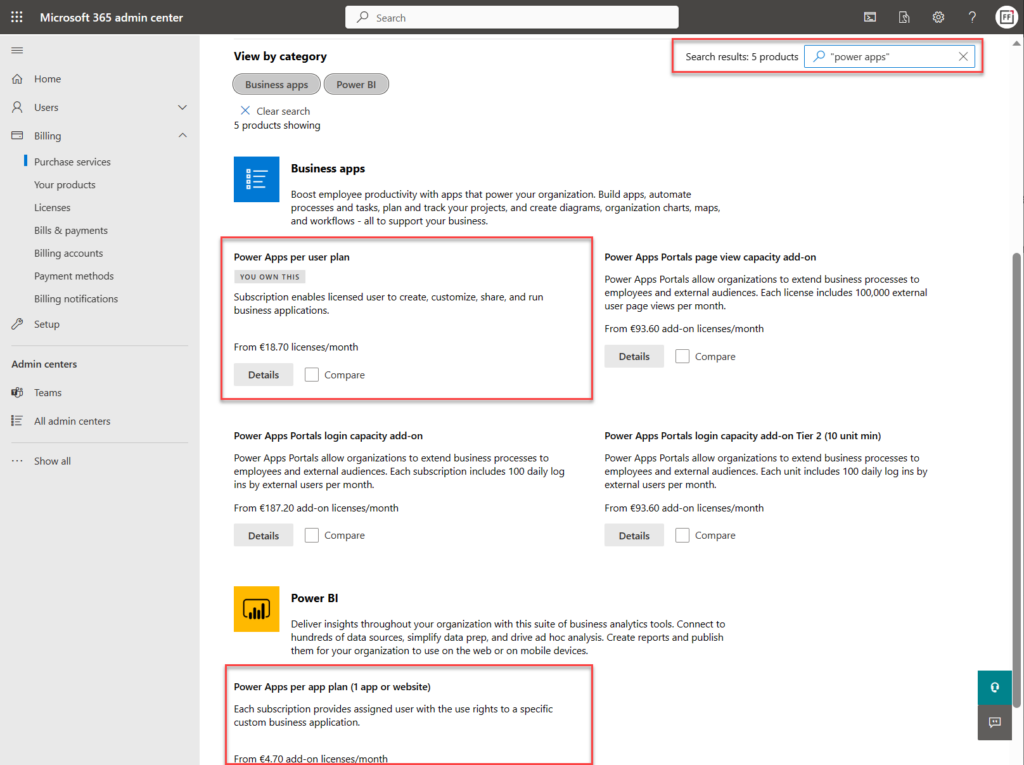
The first hurdle will be in finding the products. One might think that Power Apps would be listed under the “Business apps” category (since there isn’t a category called “Power Platform”). However, we only find the Power Apps per user plan from that category.
Let’s try a text search. Searching for “Power Apps” (or the old name variation “powerapps”) gives us the results we were after, yet in a surprising place:
Why on earth would the per app plan be categorized under “Power BI”? Well, for the same reason I need to write this blog post. The product information under Microsoft 365 admin center is simply wrong in many cases. This specific miscategorization has been in place for several months now, as an example.
Comparing Power Apps product features in Microsoft 365 admin center
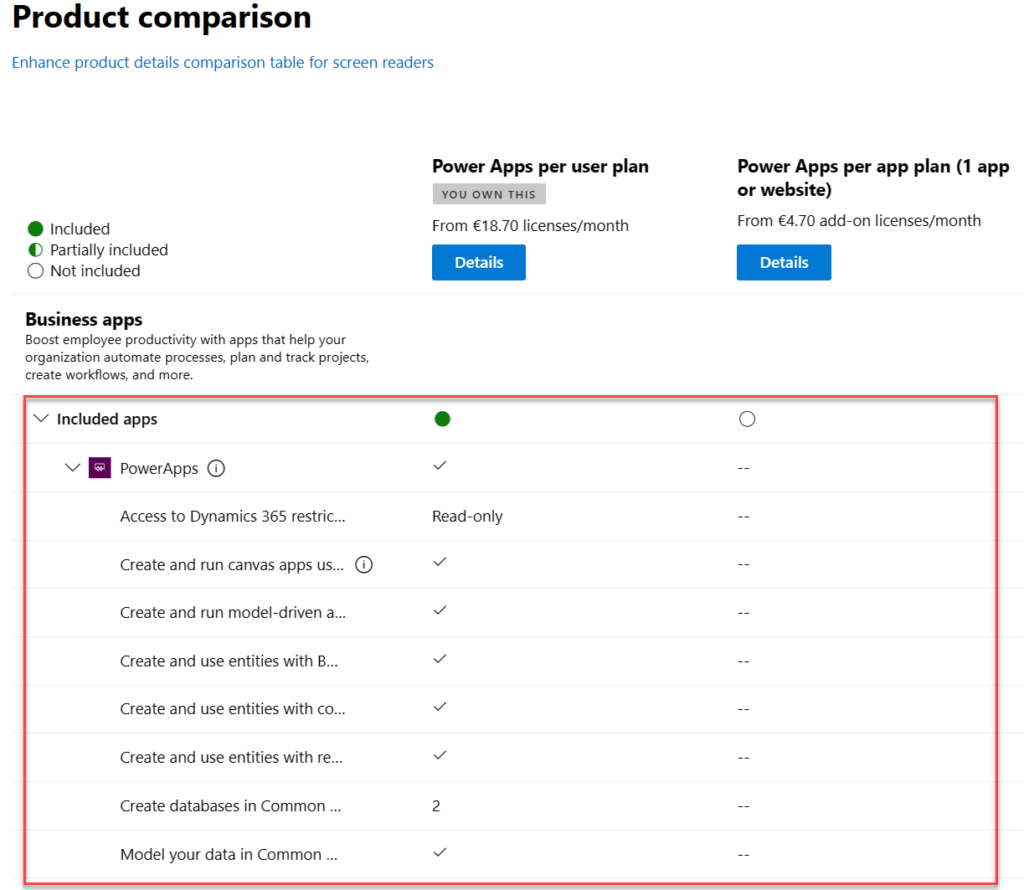
Now what we’ve got the 2 Power Apps SKUs (“stock keeping units”) on the same results page, we can tick the “compare” box on them. Upon opening the comparison page, this is the result we get:
There is absolutely nothing right about these product features. Even the product name and icon in the comparison section are outdated. They refer to the old SKUs of PowerApps Plan 1 and PowerApps Plan 2, which were replaced by the Power Apps per app plan and Power Apps per user plan on October 1st, 2019.
The problem is, someone responsible for the commercial information managed in the Office 365 / Microsoft 365 online store didn’t understand this change was not simply a rebranding. You can’t just replace “Plan 1” with “Per App” and get away with it. Someone truly missed the memo of Charles Lamanna when he announced the change on July 25th, 2019.
“We are also removing feature and capability differentiation across the paid, standalone PowerApps and Flow user-based plans. All customers will be able to benefit from the full features of the services, regardless of which plans they purchase. Key concepts like complex entities, or model-driven applications, will no longer be available in only some of the licenses.”
Taken from “New licensing options for PowerApps and Microsoft Flow standalone paid plans” on Power Apps product team blog
Let’s look at the list of features that are presented in Microsoft 365 admin center ~4 years later and see what errors we can spot:
“Access to Dynamics 365 restricted entities.” It used to be read-only for Plan 2 and no access for Plan 1. Today, the entities (nowadays renamed “tables”) categorized as restricted are read-only for any Power Apps license. Also, everything else has full CRUD rights.
“Create and run canvas apps using common data service for apps”. First of all, “Common Data Service (CDS) for Apps” as a term was replaced with Dataflex…sorry, Dataverse, quite some time ago already. Both Per App and Per User today have identical right to using this, unlike what the comparison table claims.
“Create and run model-driven apps using Common Data Service for Apps”. Showing this as not available in Per App is entirely false. As anyone reading the memo from Charles would have spotted: “Key concepts like complex entities, or model-driven applications, will no longer be available in only some of the licenses.”
“Create and use entities with Business Rules and async workflows”. Available in both Per User and Per App licenses, unlike what the product comparison table says.
“Create and use entities with code add-ins”. Sigh… See above.
“Create and use entities with real-time workflows”. Oh come ON! See above.
“Create databases in Common Data Service for Apps (per user)”. Ooh, what an ancient relic this line is! Saying that Power Apps per user plan allows you to only create 2 databases has no basis whatsoever in the current licensing model. Customers can create as many Dataverse environments (meaning CDS / XRM databases) as their available storage capacity permits. Furthermore, today anyone can create up to 3 Developer environments for themselves, without having any premium Power Apps license.
“Model your data in Common Data Service for Apps”. Does anyone still want me to explain to them that there’s no difference between Per User and Per App entitlements here? No? Good. You got the memo then.
Closing thoughts
For those of use who have been tracking the platform evolution of MS Business Applications over the years, it’s pretty much business as usual to encounter MS materials and information that reference outdated versions of products. The names change, the icons change, the licensing models change – this happens all the time and we’ve come to expect it already.
If you don’t have prior experience on the commercial aspects of Microsoft’s product stack, though – this can be highly confusing. Imagine that you’re trying to compare different low-code application platform vendors and the information provided by the online store is like what we’ve seen above. Not the best way to build trust and convince customers that the pricing model is transparent.
Why does this happen then? Why aren’t the product details updated in customer facing portals? Well, I don’t think anyone intentionally wants to mislead the audience here. I believe it’s simply a reflection of how inside a huge corporation like MSFT it can be very difficult to coordinate such updates. Every time some product gets “reimagined” there must be a million places that would need attention internally at Microsoft (us partners surely feel the impact, too). Sometimes the friction in the systems may just be too great to overcome, such as in commerce engines like Microsoft 365 or technical dashboards like the Azure portal.
Power Platform products and pricing
If you’re interested in seeing the Power Platform product prices on a single page, take a look at a summary that I’ve created for my own reference: Price points of Power Platform. I can’t promise it to be always up to date either, but at least I have a lot less bureaucracy to overcome than the official channels.😁
This text was written by a human being, not AI – even if some of the images are AI generated.
Adding such a disclaimer would have sounded ridiculous only a few months ago. Today, many of us are starting to be rightfully sceptical towards online content we come across that touches upon any current hot topic. Is it organic or at least partially machine produced?
LLMs, large language models, struck earth like a meteorite in the end of 2022 and made some of us question what we really understand about the current capabilities of computers. If you’ve logged in to ChatGPT or signed up for the New Bing version now running on top of OpenAI’s GPT-4 model, you will have certainly experienced a “WTF?!?” moment or a few when seeing the kind of answers they can come up with.
In this blog post I’ll reflect on the experiences I’ve had with this latest wave of AI capabilities and how I think they potentially will change the business I operate in. Meaning low-code application platforms (LCAP) and in my case the Microsoft stack of tools.
Why didn’t we see this coming?
When discussing the AI phenomenon over a pint of craft beer with a colleague of mine a couple of weeks ago, he asked a great question: “why didn’t anyone see this recent AI wave coming?” Indeed, how can people in the tech industry be so surprised about what took place in 2022 on the AI front? Where’s the catch? Is this real or just momentarily hype that will fade away once the next hot topic comes along and takes over our LinkedIn feeds – in the same vein as web3, crypto, metaverse etc.?
One of my all time favorite phrases is “first gradually, then suddenly”. It applies to pretty much any disruptive change that the world of technology and business encounters. Things like AI don’t just emerge one day and immediately start wrecking havoc. Instead they remain in the “bubbling under” stage for quite some time, then they suddenly erupt.
ChatGPT has been called the iPhone moment of AI. If we think about the technology that Apple put together to create the original iPhone as a product, key elements like touch screens or downloadable apps were all introduced many years before by the biggest player in the phone business (Nokia). It was not the existence of these technical capabilities that created the perfect storm. It was the way in which they were delivered to the market as a product that made people think: “wow!”
Creating a web service like chat.openai.com and just casually making it available to the whole world on one day was completely different from having the GPT family of LLM published via the traditional APIs and researcher/developer focused forums. Unlike the iPhone as a physical product, no one needed to purchase anything or make a switch/commitment to experience the potential of generative AI. That’s how you grab the attention of the world in these always-on always-connected days.
Even alpha geeks like Bill Gates didn’t believe it was going to happen this fast. Tech giants like Google had been sitting on much of the technology needed for building what became ChatGPT, yet they lacked the financial incentive to proceed with it. As a result, in 2023 I’m now using “just Bing it” in a non-ironic way. One year ago I would have given a below 0.1% chance for this being the year of Bing – and today it already clearly is such. Google has access to all the necessary tech to grab the lead, yet the dynamics of their business model (targeting search based ads) is a force very similar to that which took Nokia under once phones became computers. Google, like probably also Nokia, became a victim of their delusions of excellence.
So, about the original question. No one saw this coming because that’s how disruption always happens. Which leads us to the next topic:
OMG, they’re coming after us now!
In the IT consulting business we’re accustomed to the endless talk about change. Everyone wants to change the way how people use technology, and many are surely fantasizing about being able to disrupt existing business models. Very rarely, if ever, do us tech people see ourselves as the target of such disruption. Until now, that is.
What the recently discovered capabilities of LLM based AI systems have shown already is that a very, very significant share of what us knowledge workers spend our days doing while at work can be handled by computers. It should be a wake-up call to all of us: we have been wasting our wetware brain cycles for reading and writing things that generative AI should be processing instead.
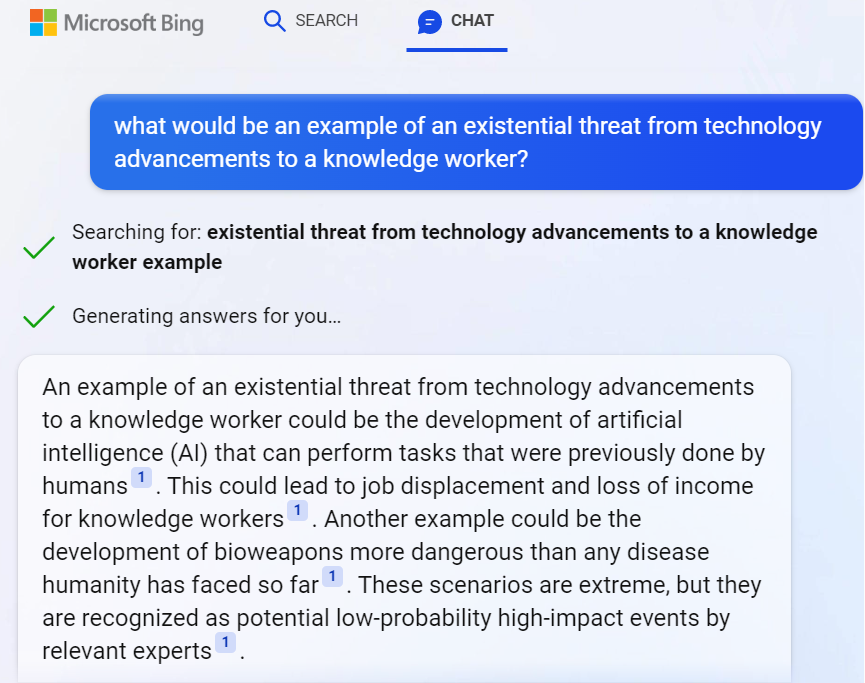
Shouldn’t we be happy about AI coming and promising to handle the mundane parts of the consulting business that we didn’t really enjoy all that much anyway? While everyone sort of cheers for the virtual assistant that can process our emails, summarize data, generate reports, (very shortly) do basic interactions with CRUD based systems – some might notice that this also sounds like an existential threat. Even Bing knows it:
Ah. AI skills and bioweapons nicely coexisting in one answer from a service that used to be just a dumb internet search engine a few months ago. Nothing to see here, folks! Move along!
When I first started to explore this recent leap in AI’s capabilities, I was introduced to Moravec’s paradox. It states that high-level reasoning requires very little computation, while low-level sensorimotor skills require enormous computational resources. In short what this means is: replacing the driver in a car will require a huge amount of computing resources, whereas replacing the office worker sitting next to a computer all day is almost trivial in comparison.
This is not what most of us have been taught about how technical advancements replace human workers with digital tools. Yet it makes perfect sense when you think about it. The natural selection of evolution has had billions of years to develop the skills we use for observing and operating inside a physical space. Email has existed for only 54 years. We are all really just helpless babies when it comes to processing data, yet we are quite advanced in our abilities needed when diving through the busy streets of a city full of physical objects / actors.
The arrival of year 2022 level AI skills in the form of LLM was the first time many of us ever needed to take a look in the mirror and say:
We used to be the ones disrupting the working life of others. Now we are gradually joining the ranks of disruptees. No, I still don’t regret one bit that I chose to pursue a career in the cross section of business and IT. This is a much better position to be in when thinking about what lies ahead and who’s got the possibilities of participating in building something new and exciting.
Things have always evolved and we’ve seen technological leaps before. I just can’t help thinking that the world in which I grew up to understand what IT is about will now seem incomprehensible to the new generations who’ve yet to discover it.
Backward never
As a child, the first time I got the chance to physically interact with a computer was the ABC 80 that my dad bought. Serious computers seemed very complex to use, yet at that time I was young enough to entertain myself simply by typing on the keyboard and pretending to use the computer. Fake it till you make it, right?
Photo by Frédéric BISSON: Pacman on Atari 800XL at RetroGaming Days IV
When I got my first personal computer for myself, the Atari 800XL, it supported loading games from a cartridge that you just plugged in. That was the “instant gratification path” of using a computer. I did also start reading the magazines of the time and even typed in a few of the Basic games, transforming the code that was printed on the paper into bits that I typed in via the keyboard. It was interesting, yet it always felt too hard to achieve some tangible results. Code didn’t provide me a way to express myself. It wasn’t until I started creating music on the early PC tracker software that I saw computers as a tool for creativity.
My kid is now 3 years old. As he’s getting exposed to how technology is used in our daily lives, I’m pretty sure he’ll never see computers as “hard to use”. Now as the natural language interaction pattern will presumably quickly take over most casual usage of smart devices, the concepts of programming or code may remain very distant to him. He’s already happily giving Google Assistant voice commands via a smart speaker in our living room. Why wouldn’t it work for everything by the time he’s old enough to start creating things with computers on his own?
It goes far beyond the difference between punching keys vs. shouting commands. As of today, Google Assistant is a complete moron compared to ChatGPT. It won’t be that way for long, though. The idea of a computer that understands what you want to achieve without it having been programmed to fulfill that specific request is a shift so profound that such AI capabilities will be infused in every possible smart device. Because otherwise calling them “smart” with the 2021 level of skills would just get the vendors laughed out of our homes and businesses.
Soon, no one will be given the opportunity to claim that they don’t know how to use computers. There may not be a single visible computer around, but everything around you will be processing data and adjusting itself to the sensors inputs. That’s likely the world in which our children will grow up in, regardless of what we as parents would do. Life without ubiquitous AI may soon be like trying to live without electricity.
And now to Power Platform.
Everyone as a developer
The idea of how the low-code Power tools could eventually democratize the creation of applications is something very close to my heart. The products were introduced roughly a decade ago now. At around 2018 I started talking about the crazy idea of how in the future creating apps would be as commonplace as creating documents already was. I used it as a way to get my point across when talking with colleagues, claiming “every PowerPoint should really be a PowerApp”. I wanted to challenge their traditional idea about apps being something big and expensive created by professionals, insisting that they could also be small, disposable things created by anyone with a computer.
MS has of course been talking about infusing AI into their product portfolio for a long time already. We’ve seen some neat little demos and product features introduced with what NLP (natural language processing) has been able to do, but in reality it hasn’t had almost any impact on the everyday life of the app/flow/report makers. Sure, AI Builder as a citizen friendly entry point into the world of Azure Cognitive Services has seen some real-life usage, yet it has hardly been a mainstream tool for citizen developers.
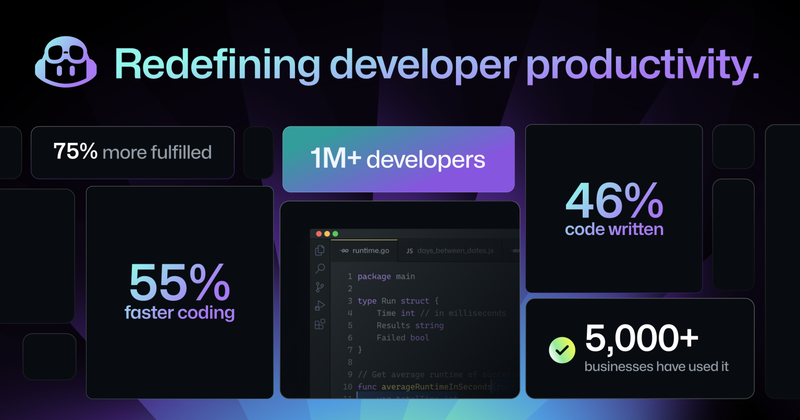
The more powerful next generation AI features have first landed on the pro-code side, under the GitHub Copilot product. These stats from the announcement of the latest GPT-4 based Copilot X version give some indication about the adoption rate. It doesn’t sound like just a marketing gimmick anymore. A fair share of developers out there are probably at least considering taking it into everyday use for the process through which they produce their work output.
Those of us who come from outside the world of programming and spend our days working with something other than raw programming code could soon be facing the same question: should I let AI do a part of the work for me? As anyone with more extensive experience on Power Platform probably agrees, low-code does not mean low complexity. Working with data, business logic and UI can present quite a cognitive load, even if you are “just point’n’clicking” or writing Power Fx formulas instead of JavaScript or C#.
If anything, no-code/low-code should become the area in which safe usage of AI generated components would go mainstream a lot faster than in code generated without any productized guardrails around it. In the end it’s still all made of code and it all runs in the Microsoft cloud already (in the case of Power Platform). Training dedicated AI models to serve this well defined playground should be a very doable task for the platform provider. Of course the UX of how app makers interact with the generated results needs to be thought out, as direct manipulation of the generated code wouldn’t be quite ideal.
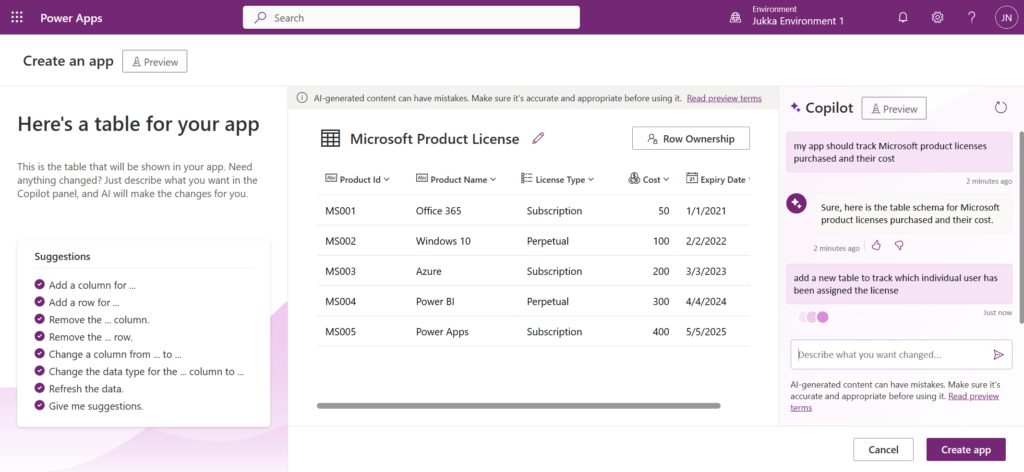
If business users will learn to leverage Microsoft 365 Copilot to generate documents for them, how far can we be from the stage where they are also comfortable generating apps and automations in the same way? I believe were are definitely moving into the direction where questioning the abilities of non-programmers to design and develop their own tools isn’t a valid generalization to make anymore. I honestly did not believe we’d get so close to the state of “hey Copilot, turn this PowerPoint into an interactive Power App” being a possible reality this soon.
This, in turn, will lead us to the question to think about: is this what the world really needs?
The NoApps future
In the end, people don’t need apps. In the same way as the record industry was formed around the concept of producing, promoting and selling physical items containing a representation of music created by the artists, our current business applications consulting industry is also focusing on the intermediate output. The actual value delivery is something we must never lose sight of. Else you may find yourself selling plastic discs when the world has decided to jump into streaming audio instead.
Quicker creation of apps will initially have plenty of demand I’m sure. Besides, it really is a cool demo that you could draw a form design with pen & paper and then have AI generate a digital app’lified version of it (both Microsoft and OpenAI have used this scenario). Yet it’s still just a static data capture form. How many forms can employees or consumers navigate through during their days before getting exhausted with the “there’s an app for everything” experience?
These UIs for standardized data capture and processing have been needed because our technology couldn’t previously work with anything more fuzzy. Well, we’ve now seen through ChatGPT that it most certainly could. Not only can the AI figure out what us humans mean, regardless of what language we type our text in. It can also figure things out from what anyone else out there in the world has written.
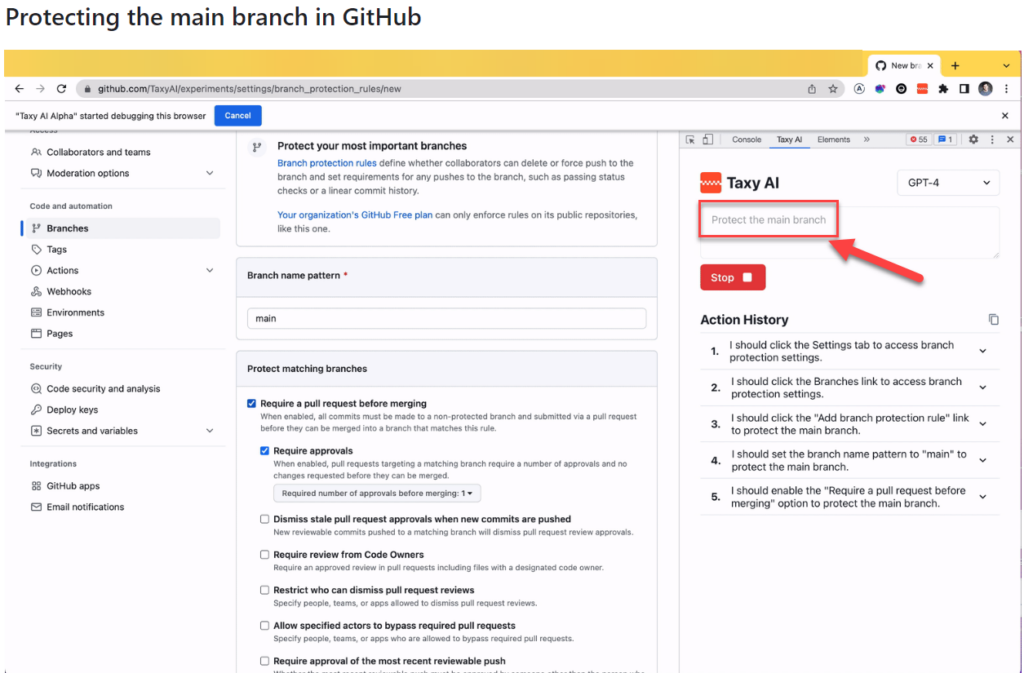
There’s an interesting demo / research preview of “just some guy” applying GPT-4 to instruct the web browser on what to do. Not just writing out the instructions but actually performing the steps. In the example provided in this TaxyAI project, while on the GitHub website, giving a prompt “protect the main branch” will trigger the AI to do research on what that means, where it should be clicking, and then completing the steps as an RPA style bot:
I’m not saying this is a tool that would go mainstream. Rather it serves in giving ideas on what the tech giants out there will be creating with their 1000x budgets. The Copilots of tomorrow will not just return a box filled with text that they generated. They’ll probably do the actual work for you, rather than just providing instructions.
Think about all the process documentation and ad-hoc instructions that has been created inside a medium size enterprise. It will never be realistic to turn each of them into dedicated apps and automations. Yet if we get an AI service that can read these instructions created in human language, turn that into actions for the computer, and then complete the chain of activities to move from the original process input to the final process output – that would be something.
The concept of “working out loud” by proactively sharing our observations of the world and our accumulated knowledge with the community of colleagues meeting on a digital platform has been a great productivity booster and a source of professional & personal growth for me. Today with ChatGPT or Bing we can gain further benefits by “thinking out loud” with the machine, providing it a sequence of dialogue like prompts. The natural evolution from this could lead towards a world that actually supports “working by thinking”:
“Hey Copilot, I spent €50 on a cab ride.”
“I can see that you’re in a city where you had previously agreed to visit for a customer project. I’ve grabbed the Uber receipt from your email, filled all the details into our corporate systems and the reimbursement has been deposited back to your bank account.”
Instead of this sounding like a scene from some flashy “World of Tomorrow” video created by IT companies to sell us boring & expensive tech of today by using a fictious scenario from the year 2060 or something – it doesn’t sound too far off anymore. An AI assistant that understands what we say we want & what others say we should do in order to get it is in theory here today already, in the form of LLM based chatbots.
We just need to plug it in.
Endless problems
Cue the soundtrack from The Terminator. This is exactly how you create Skynet, isn’t it?
“Defence network computers. New… powerful… hooked into everything, trusted to run it all. They say it got smart, a new order of intelligence”. “Skynet saw all humans as a threat; not just the ones on the other side” and “decided our fate in a microsecond: extermination”.
Michael Biehn as Kyle Reese in The Terminator (1984)
AI will introduce brand new problems for humanity. Some will be existential (“is there a place for us in the world after AGI arrives?”), others much more mundane. What I’m somewhat worried about is that we’ll be faced with them pretty much all at once in the greater scheme of things. Without the ability to identify what is a serious issue for the whole world, what is merely a speedbump on the road to innovation and business productivity, we’ll be mighty confused.
The number of things we could be worrying about when it comes to AI is overwhelming already today. Use this list as an example and pick one item if your bag of worries is looking empty:
Copyright issues of imitating/borrowing content from original makers without permission.
Tech monopolies growing even bigger and stronger than they are today.
LLM hallucinations making it impossible for us to know what’s right & wrong.
The internet & every media getting flooded with machine generated content.
Biased data in the training sets inflicting harm on how minorities get treated.
Next generation surveillance society á la Minority Report.
The challenge I see ahead is that AI may be unlike anything we have ever encountered before. Sci-fi literature and movies have attempted to provide at least some context to the phenomenon, enabling us regular human beings to talk about what’s happening around us by using references from popular culture. Yet where are the AI consultants that will help organizations of all shapes and sizes make sense of this? (I know: just open LinkedIn and everyone is an AI expert there these days. But anyway.)
The range of reactions to AI that we can expect to encounter when starting to talk about it as just regular technology consultants is probably going to be all over the place. Many organizations will have legitimate legal and compliance concerns that will cause them to choose the “better safe than sorry” approach and put things on hold. Elsewhere, the gains from initial experiments with LLM powered information systems may turn out to be so compelling that AI becomes the next Digital Transformation that must be sprinkled on top of everything the company does.
I suspect the divide between individuals will be even greater. Just like the low-code tools have enabled the new breed of app makers to stand out from the ranks of ordinary business people and create something few of their colleagues could have ever imagines, the same thing can happen with adoption of AI tools. One’s formal education nor professional background may not be the best criteria to identify those who’ll be able to apply this new technology into solving real life problems.
If anything, I suspect it will be even more likely that the domain experts, the citizens, will be able to set aside all those “this AI generated code is garbage compared to what a true professional developer could write” complaints and just focus on the end results from using that code instead.
Good enough is close enough
We’ve been taught to believe that the world of computing is very binary by nature: it’s either 0 or 1. Computers either behave in a logical, repeatable manner and deliver the exact result they have been instructed to – or they deliver nothing but an error. People trust the computer to be right just as long as someone programmed it the right way.
LLM’s have flipped these roles around. Now the computer is the creative one, generating an endless list of ideas and content variations, based on the simple prompts given to it by humans. Not instructions like code, as there’s no way to guarantee that the neural network would produce the same output the next time you provide the exact same input. This new generative AI is whimsy and unpredictable, which makes it so much closer to behaving like us humans do.
If you work in a profession where any part of your output can be presented as text, there’s a high probability you’ve given ChatGPT a go and tested how it performs in producing similar outputs. It’s equally likely that you’ve seen the answers given by the machine to contain plenty of factual errors. “Hah! Nice try, AI, but no matter how much data they feed you, you’re still just a stochastic parrot“.
We should of course take pride in our craft. Many of us work in an environment where the professionals who can provide the most detailed answers to questions presented to them get the highest amount of respect. We gain trust from others, we build up our own confidence, we “level up” by being knowledgeable in our field and delivering high quality work outputs.
Are you always right, though? Of course not, we’re all only human.
Can you apply your expertise to any areas of business? Heck no, the deeper we go on topic Z the less time we have for studying topics A…Y.
Can you work 24/7/365? Not possible, you know that.
Communicate in any language? Why are you even asking these th…
WILL YOU WORK FOR FREE?!?!? Okay, I prefer not to continue this discussion anymore.
AI doesn’t have to be perfectly accurate to be of extremely high business value to companies. It only needs to be close enough, so that the superpowers it does possess over us living and breathing human beings can be put into use. Yes, it will very often need supervision and intervention from humans at some stage of the process. Yet the biggest financial gains will be achieved wherever the share of human work can be brought down to a minimum. Which means people will be very creative in finding ways to harness the creativity of AI in novel ways.
AI can always be there for you when needed, whereas a human professional cannot. In my line of business, today the customers are googling for answers and following videos & blog posts to manually repeat the steps on a computer to get their job done. When it gets too tricky or they don’t even know what to search for, Power Platform Advisors can step in and ensure the desired results are achieved. Customers can rely on us, but they need to sacrifice both their time (adjusting to whenever we are available) and money (sorry, we also have to make a living).
If you can take away all these nasty human constraints, AI will be a sweet enough deal to consider as an option for pretty much anything. People will try it because the barrier is almost non-existent. The tools for creating business solutions will have the Copilot capabilities baked into them, thus promoting them as the first resort. You’d be crazy not to use them.
What about the possible damages, though? Let’s say that generative AI is right 90% of the time and a human professional gets to 99% accuracy. When your AI built business solution causes big problems for the first time, won’t everyone go back to the good ol’ professionals?
There will undoubtedly be business models emerging that work a bit like insurance does. Since we can’t be sure that LLM based answers are correct, and we also can’t sue the AI for providing us wrong advise, someone needs to step in and become that middleman. Yes, accidents will happen and someone needs to cover the damages. Now, if your AI based service costs €20/month instead of €200/h and you’ve got a policy that promises to fix whatever issues were caused by unsupervised AI-driven decisions – it can be quite a lucrative model for both parties.
Bicycle evolved
Steve Jobs called the computer “a bicycle for the mind.” It is a beautiful, powerful metaphor. In the early 80s, the democratization of computing through the rise of a personal computer that was available for work and personal tasks was presented as a huge leap in the capabilities of an individual. Just like hopping on a bicycle improves man’s efficiency on energy use per kilometer travelled beyond that of any animal in the world, our possibilities for cognitive work rose onto a new level as computers became an everyday tool within our reach.
AI could lead to something of similar magnitude eventually. Is it just a faster bicycle, though? Did our computers become more powerful or did the tools change in a way that requires a new metaphor? When talking about LLM based tools like ChatGPT specifically, I quite like the analogy of “calculator for words”. It underlines the way in which these new tools of 2023 need to be approached as not the all knowing sources of truth but rather the wizards of words. They are extremely powerful in delivering combinations of words to represent most things us humans use text for (be it communication or code). However, assuming that they understand the world in the way that humans do is a mistake to be avoided when making use of their wizard skills.
If the electronic calculator was brought into an office where everyone had previously been crunching the numbers with only pen and paper, what would be its impact? A thought exercise like this might help us in understanding why there will be both enthusiasm and scepticism expected as AI capabilities begin to appear in the applications and platforms used in organizations today. And just like what happened to the physical calculator devices, eventually we’ll get a next generation of machines where the ability to perform calculations is just one app among many.
When you’re starting to use a brand new computer or phone, usually one of the first things you’re presented with are these questions:
What language do you want me to speak?
Where are you located?
This allows the device to understand not just the preferred UI language and your physical location. It also enables it to make educated guesses on:
Which formats make sense to you for number, date and time fields.
What time zone you are living in.
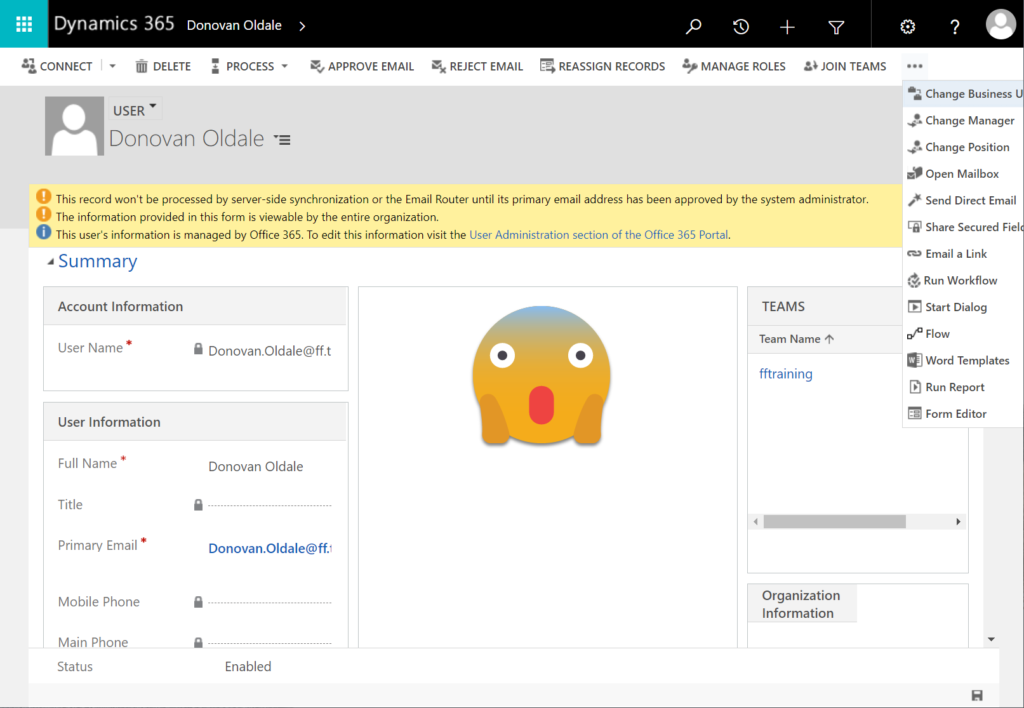
Now, let’s move from devices to software, namely model-driven Power Apps. Do you recall seeing similar onboarding prompts when starting to use (or build) apps? Nope, Microsoft doesn’t ask such questions.
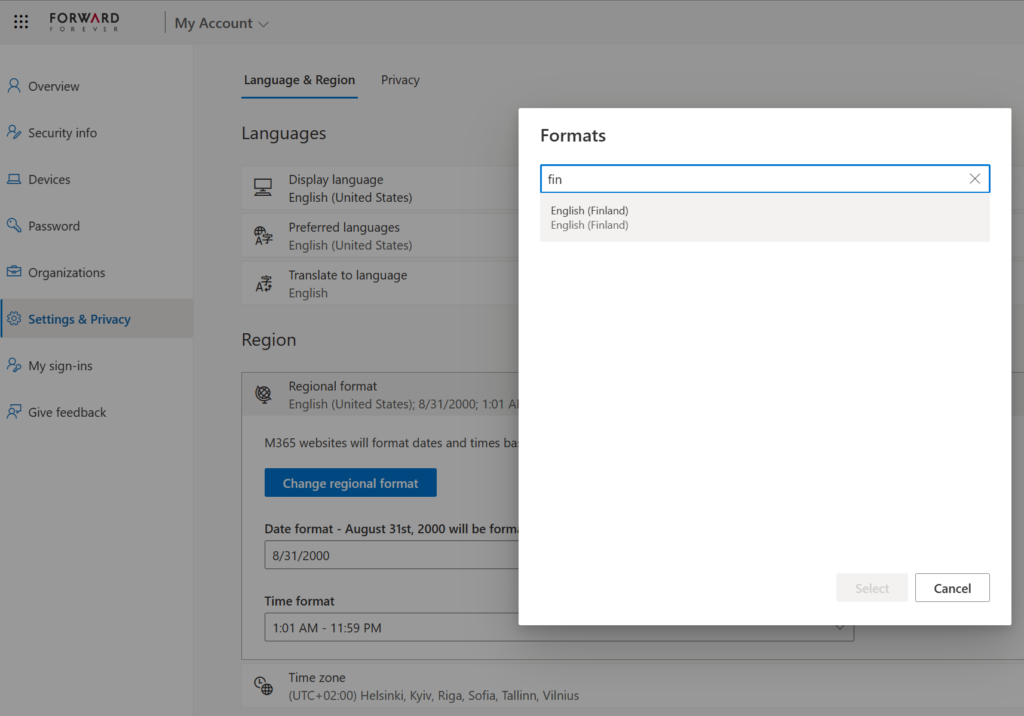
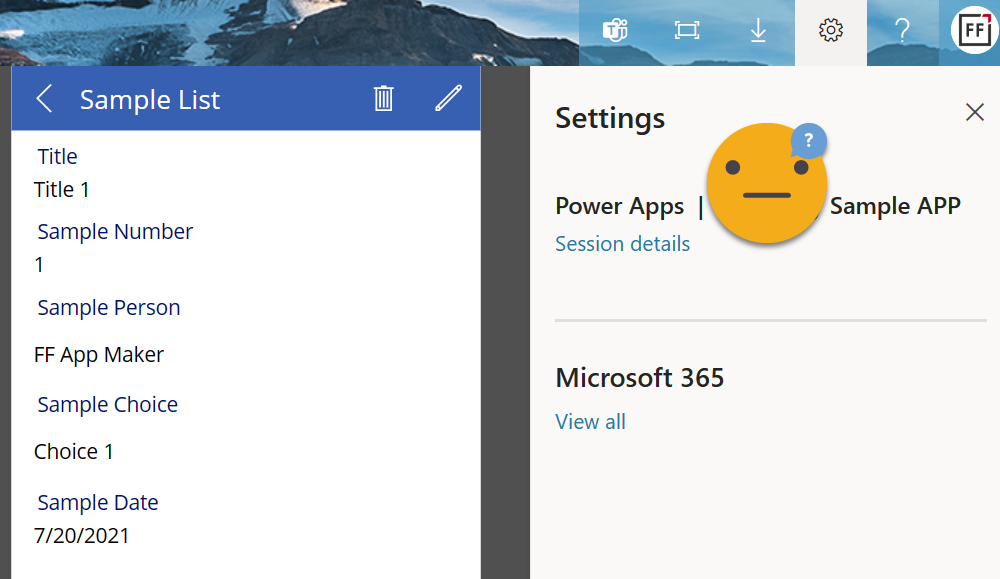
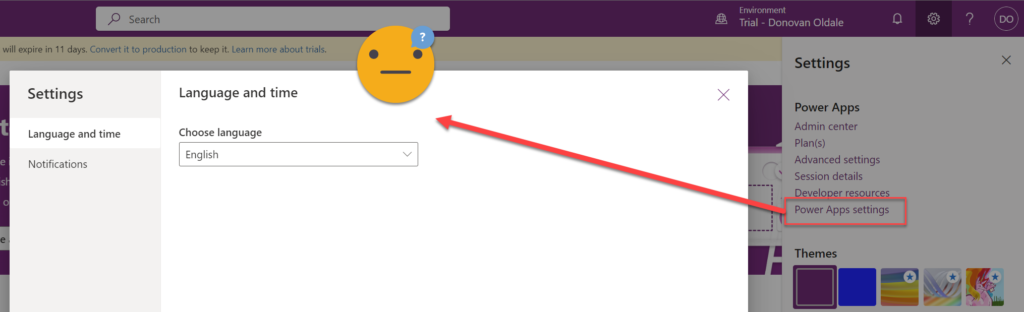
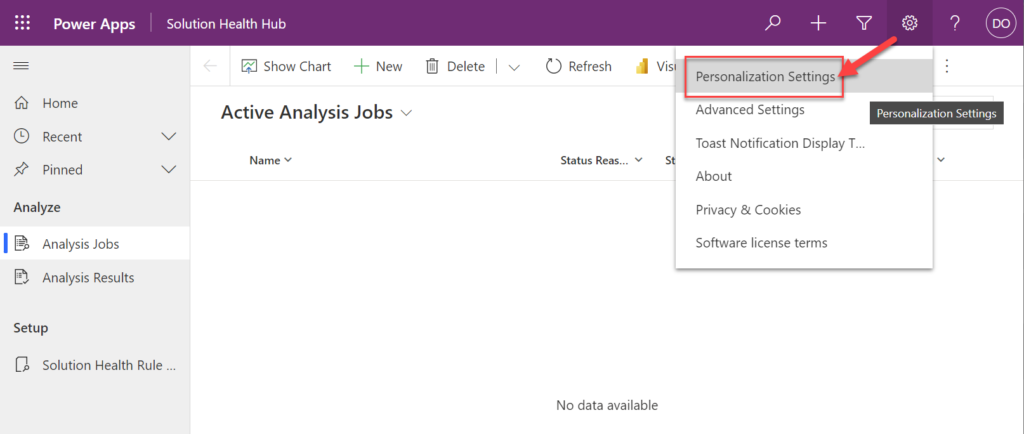
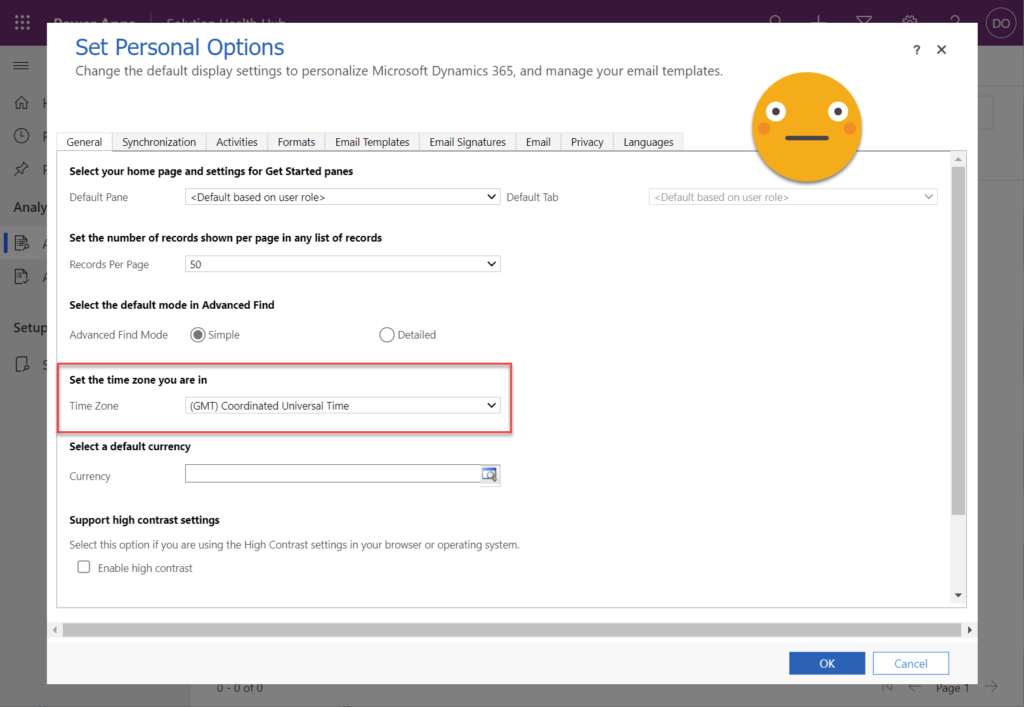
“I guess they already have that information and are automatically setting things up the way I want them.” Yeah, you might think so. That’s a false assumption, unfortunately. Changing your Microsoft 365 account settings for your tenant isn’t going to get synchronized down to the business applications used in the MS cloud. Meaning, this selector here has no impact on the apps that live in Power Platform environments:
Power Apps canvas apps follow the regional settings from the user’s browser. This can lead to confusion as well, but at least the field formats should be something the users encounter on other websites. In canvas apps there is also the ability for the app maker to force specific locale settings per each control in the app UI. See examples in this article.
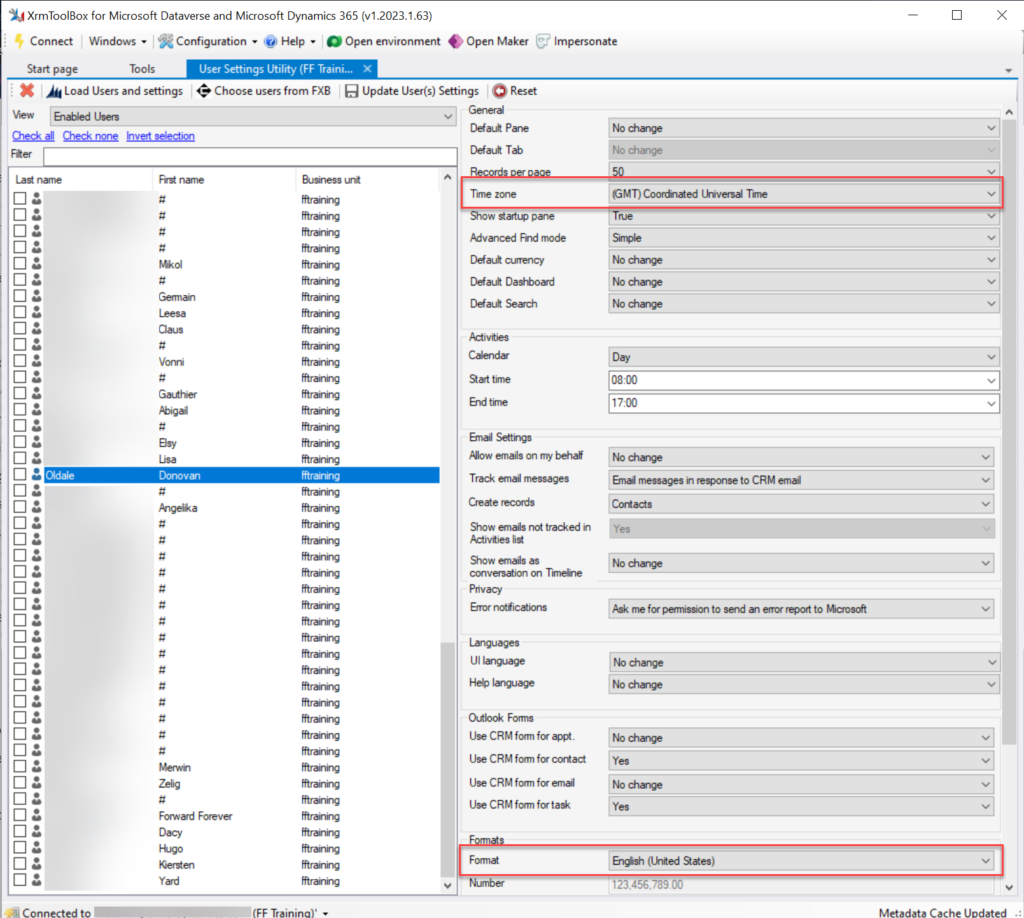
Model-driven Power Apps include Dynamics 365 apps from the CRM side. I would guess that for a sizable share of model-driven Power Apps users their settings are likely to be at least partially incorrect. What’s worse is:
Fixing them is quite unintuitive.
Admins can’t do much to help users with this.
In this post I will explain the parts of the Power Platform user settings management story that are broken today. My intention is to spread awareness on issues that many app makers and admins may have ignored, and which their app end users may be suffering from.
In a follow-up post I’ll provide an example of a solution that could make life easier for everyone who uses, deploys or administers Power Apps.
First: blame CRM
There are many great benefits that Power Apps has gained from being merged into another Microsoft platform that first saw the light of day as Dynamics CRM (well, “Microsoft CRM”, to be precise). User settings management is not one of them, unfortunately.
The user settings functionality probably served its purpose back in the on-premises days of CRM servers. Today, this legacy from around two decades ago creates some incomprehensible experiences for an audience many times the size of that which ever interacted with Dynamics CRM.
Power Apps, be it canvas or model-driven apps, live inside Power Platform environments. It is becoming a standard feature that such environments include a Dataverse database. This is essentially what one CRM database was back in the days. Today, larger tenants may easily have hundreds of such database instances.
Dataverse hosts many essential parts of Microsoft’s low-code platform. It provides the solution framework for moving apps and related components across dev-test-prod environments, for example.
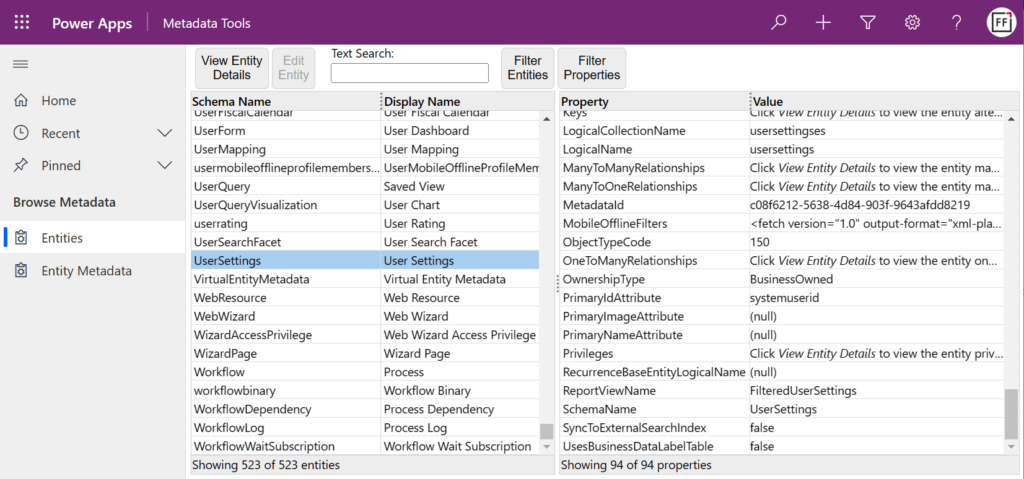
There are hundreds of tables (previously “entities”) in the standard schema, with some being meant for storing business data and others for data needed by the system itself. The User Settings table is what the topic of this blog post revolves around.
Each to their own (format)
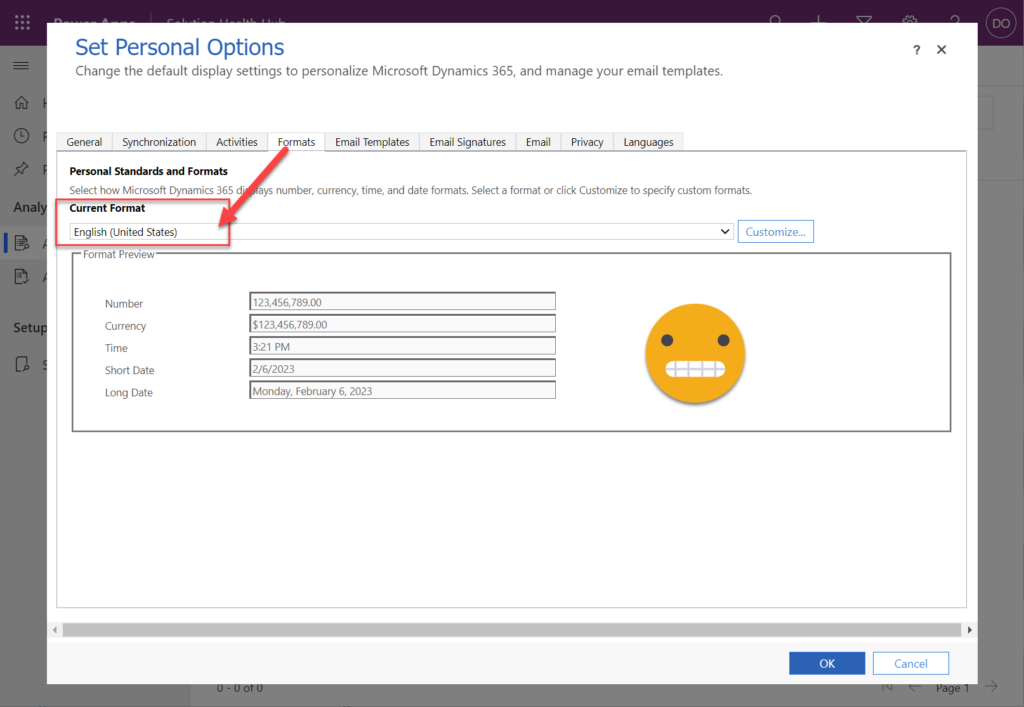
When your app is connecting to tables in Dataverse and presenting it to the user, the decision of the number, currency, date and time field formats is made on the server side. It defines whether your app UI shows “one million dollars” as:
$1,000,000.00
1 000 000,00 $
$1.000.000,00
Or any other variation. The place and purpose of dots, commas, spaces, currency symbols depends on what the format has been set to on the database side. For each user account.
That’s the important part: it’s not a global setting of the database/environment. Every user may see different things. We are all different as human beings, and it’s a wonderful feature for the system to reflect that as well.
Us humans are also wonderful in our abilities to interpret what the format being used by the system might be. All the three examples above would say “one million dollars” to most people, even if only one format is the official sequence of strings used in whichever region they live in.
With dates, it can be a bigger struggle. Today when writing this blog post, the date is 2/3/2023 – for some part of the world. If you come from the land of Microsoft, it means February 3rd. For basically everyone outside the US, it would mean March 2nd (which is the correct value here). ISO 8601 would be the best format from a logic perspective, yet for some reason 2023-03-02 hasn’t become the norm. Oh well.
We may be able to guess the right date format based on context. Where it gets really dangerous, though, is with time zones. They are invisible to the app user and you’ll have no way to know whether you’re seeing the correct value in any date field of the app.
Why’s that? Because dates in Dataverse are often stored in date and time columns. This means that while the clock on my PC currently says “2023-03-02 21:10”, the user looking at a record in Power Apps may see:
2023-03-02, or
2023-03-03
In Finland it’s March 2nd, but in India it’s already March 3rd. Not only is the value that’s shown to the user determined based on their time zone setting. It also affects the value that is written to the database when the said user enters new/updated data.
There are ways to get around this dilemma, using Date Only or Time-Zone Independent columns in Dataverse. That’s not going to help the app end user, though, since A) the column type it’s not visible to them nor B) configurable for their preferences.
One classic gotcha of the time zone settings is that they affect all user accounts – also calls made via the API instead of the UI. If you’re writing integrations to or code running inside Dataverse, you’ll need to dig a lot deeper into the topic than the shovel that I can give you is good for. Head towards a blog like Scott Durow’s and learn from the master.
Setting the user’s own settings
Now that we’ve established that user settings like time zone and field format are very important things, let’s look at how a user can make sure that they are indeed set correctly.
Say you’re using a Power Apps canvas app and want to check your user settings. Where do you click in the app? That’s the neat part: you don’t. Even if you have the Power Apps navigation bar visible (which might have been hidden intentionally), none of the menu options give you access to the user settings used by the app.
OK, let’s assume that you have been granted maker level access to the environment hosting this app (end users often will not have this option). We go to the Maker portal on make.powerapps.com and click around the similar cogwheels.
From under “Power Apps settings” we get to a promising menu dialog that has a “language and time” tab. Unfortunately, there’s nothing related to time in there. Furthermore, we’re not looking to change our language settings, rather the regional format.
Most people will have already given up at this point. Yet if you’re not afraid to click on obscure menu options, you might find a model-driven app in the same environment. Like the omnipresent Solution Health Hub that Microsoft wants to provision everywhere without asking for permission. This time we’re actually lucky to have it as the only model-driven app in our environment.
Let’s open it up. Don’t worry about that “Active Analysis Jobs” view that opens by default, no one understand what these things are about. What we’re really hunting for is cogwheels and we luckily do discover a new one, in the exact same place as the earlier ones. This opens with a promising menu option: “personalization settings”.
“NOOO!!! MY EYES!!! WHAT IS THIS THING?!?!?” No, don’t panic. You’re in the right place – even though it looks like nothing you’ve encountered in Microsoft 365 apps. What we have here is the classic Dynamics CRM web client UI presented inside a modal dialog window of the Unified Interface. Yes, it reads “Dynamics 365” everywhere but trust me, this is part of Power Apps.
On the General tab you’ll find the Time Zone dropdown menu. If it reads something else than you expected, change the value now. Then hop over to the Formats tab and do the same check/change for the Current Format field.
Click OK. Close the window. Take a deep breath. You made it.
Just don’t forget what exactly you did to get to the user settings screen. Because these settings are environment specific. The next time an internal app is deployed in your organization, it may well be hosted inside a different Power Platform environment. With user settings that are completely independent from the ones you just updated.
“As an administrator, I want to end the pain…”
Given how many potential blockers there are for a Power Apps end user to ever discover nor even be allowed to navigate to the user settings screen, this is something the Power Platform administrators should definitely look into. Is there a way to change the settings on behalf of another user?
Let’s find out. We’ll go to PPAC (Power Platform Admin Center) and navigate to the environment. From the Users list we open up one user account and study the options available.
We see a nice flyout menu that resembles Microsoft 365 admin center experience in many ways. Unfortunately it doesn’t contain anything related to time zone or format settings. Behind the three dots, there’s a “Manage user in Dynamics 365” option. By now we’ve already become aware of how broadly Power Platform relies on things that say “Dynamics” so we know we probably have to click on it.
The initial loading of the page may take a few seconds/minutes/weeks, but once it opens up we see… OH DEAR LORD!!! Not only did we move to Dynamics 365, we actually travelled back in time into CRM 2013 user interface.
We’re presented with notification banners shouting scary things at us. We have a form that contains fields, grids and feeds that seem to be design to just confuse us. We have an endless menu bar with options like “reject email” (wouldn’t we all want to reject it?) and “change position” (would fetal position be a good option right now?).
What we don’t have is access to any of the user settings. This is by design. Sure, no one said it’s a good design, but it is what it is. The answer to our original question is: there is no out-of-the-box option for system administrators to change user level settings on behalf of another user.
It’s design like this that has given inspiration to a countless number of community tools, many of which are available in XrmToolBox. If you need to administer Power Apps that have any dependencies to Dataverse, the first thing on your To Do list should be installing this software on your local PC.
XrmToolBox User Settings Utility is the plugin you’ll want to reach for in the toolbox. Once you establish a connection to a Power Platform environment (always choose the “Microsoft Login Control” option, btw), you can click “load users and settings” to see every user account in the environment. Select one of them to check the current values.
Not only can you modify the settings (time zone, format and many more) for another user. You can also do this in bulk for all selected users. “Woohoo! Now the settings are fixed!”
Until the next user comes along. Or you have a new Power Platform environment that needs equal treatment. Again and again. Being a desktop application, you unfortunately can’t automate the actions that XrmToolBox does. Well, unless you go crazy with Power Automate desktop and build an RPA bot for this…
Is there any better way?
The bright side of having the user settings data stored in a Dataverse table is that we are empowered to use the platform’s tools to build user interfaces and automations for managing it. With low-code.
I have come across a few blog post with examples of how to use Power Automate cloud flows and/or Power Apps canvas apps to update the user settings. For example, my colleague at Forward Forever, MVP Timo Pertilä, recently wrote an article about how to set the number formatting for model-driven Power Apps (auto-translated from Finnish).
As it just so happens, I had also started exploring these possibilities at the exact same time as Timo. My approach is a bit different, since the goal was to resolve the issue not just on a single environment level. So, I’ve created a tool that allows any user to go and update their own settings across multiple environments. Stay tuned for my next blog post where I present the solution.
Last time when the 2022 Release Wave 2 was announced, I wrote about why you should not pay too much attention to these bi-annual release plans. Instead I was encouraging everyone to start using the Release Planner website that listing all the planned and recently launched features as a roadmap site with no artificial boundaries between “waves”.
Now when the 2023 Release Wave 1 materials were launched today, Microsoft defaulted to pointing people to this Release Planner site (here’s the Power Platform 2023 RW1 link). Of course the challenge with that approach is that all the hot new stuff is just behind one small “release wave” filter in the list:
There are still some usability challenges with the Release Planner site that have kept me browsing through the Microsoft Docs Learn when looking for release item information. So, here’s the “switch to classic” bookmark that will take you to the MS Learn edition of the same release wave information: https://learn.microsoft.com/en-us/power-platform/release-plan/2023wave1/
There was now a nice higlights video made on the Power Platform 2023 Release Wave 1 launched on the very same day as the release plans were published. The challenge with this kind of material is that you can’t really show realistic demos about features that might be launched half a year from now, so keep that in mind when watching the video.
As always, there’s a lot to digest in the plan and you might therefore be interested in reading the hand picked top items by some trusted folks in the Power Platform community. As a purely subjective opinion, here are the top 5 items in 2023 RW1 that I was initially most excited about when reading through the plan.
Fluent UI everywhere
We’ve seen the concepts and components from Microsoft’s Fluent Design System introduced here and there when it comes to Power Apps and Dynamics 365 app UIs. The Power Platform Creator Kit has brought Fluent UI controls available to canvas apps built by advanced makers. Demos of the future model-driven app UI have included features like dark mode that are familiar from the more modern product UIs on the Microsoft 365 side. Now with 2023 RW1 there should finally be a wider roll-out of these modern controls for the MS low-code application platform, too.
You may remember that small tweaks to the model-driven UI have been taking place in pretty much every release wave. This update should be a lot more impactful than the previous ones – which is why it will be rolled out behind an opt-in switch initially. You can expect some things to break in the process, so it may take a while before MS will dare to push it out to all users by default.
Canvas apps, on the other hand, have been living in a split reality for a long time already. Dataverse for Teams based Power Apps have used the Fluent UI controls since forever, causing friction for app development across Teams vs. full Power Platform environments. Hopefully this coming update will now bridge the gap and get us closer to the dream of “Run One UI”.
Responsive canvas pages design experience
The one place where model-driven apps have felt clearly superior to canvas apps in their UI capabilities has been the responsiveness of the screen layout. Their many constraints on adjusting how the menus and forms can (or rather can’t) be configured have in turn made it amazingly simple to adjust to different screen sizes. The platform handles it out of the box, the maker doesn’t have to worry about it much at all.
Building responsive canvas apps has been technically possible, yet something that feels quite tedious. I’ve mostly had to deal with responsiveness in apps built in Dataverse for Teams, where worrying about which fields, columns and buttons fit onto the screen when surrounded by the Teams UI chrome has been one of the unavoidable everyday frustrations.
2023 RW1 release plan gives us a glimmer of hope by showing a screenshot of the coming responsive layouts and spacer tools in the canvas studio. The ability to resize controls and spacing directly in the authoring canvas could greatly reduce the effort needed in achieving sufficient levels of app UI responsiveness. Not on the same level as model-driven for sure, yet it could offer a decent compromise between precise control positioning and responsive reflow of controls on the page.
Control system administrator role assignment
No matter how granular the security model in Dataverse is, this granularity has vanished when you go up to the admin roles. Every Global Admin or Power Platform Admin will automatically be granted the sysadmin role for every Power Platform environment in the tenant. While it makes sense that people with powerful roles get wide access, it is often not desirable that such user accounts would by default see all data, be it via UI or API. After all, usually the admin roles need the power to change settings and work on the metadata – not the actual business data managed in Dataverse.
Now MS is promising that customers will be able to manually assign the System Administrator role to appropriate users in the environment. This is a very welcome feature to have control over the auto assignment, even though we don’t yet know now exactly what process will be built around this. Also keep in mind that certain governance features like this might get bundled into the Managed Environments capability, which would limit its available to premium licensed users only. Let’s see how it goes.
Personal environments with Dataverse
It has already been possible for users to sign up for the Power Apps developer plan – as long as they are aware such a thing exists and find the right path to acquire it. Now MS is going to promote these type of environments to Power Platform makers much more prominently within the product. They will be called “personal environments” and the idea is to lower the barrier for all makers to experience premium capabilities like Dataverse.
Unlike trials, personal environments won’t expire. Unlike sandboxes, the makers won’t need help from the Power Platform admins of the tenant to get a personal environment provisioned. There will be new governance capabilities introduced that give admins the possibility to disable this feature if required, yet hopefully most organizations wouldn’t need to introduce such a limit. Personal environments don’t consume tenant level capacity, so as long as there’s a solid governance plan in place to apply DLP policies, the risks should be fairly low with these personal environments.
Check out this Power CAT Live video for more details about the developer plan and its enhancements (YouTube embedding disabled by Microsoft): https://youtu.be/yXRSnN2AWTs
Paginated reports editing on the web
Back in 2006 when I got introduced to the technology that later became Power Platform, the one area that struck to me as incredibly difficult was report creation. SQL Server Reporting Services had just replaced Crystal Reports with a native Microsoft technology in the stack. While there was plenty of advanced features available for summarizing data, the number of hoops you had to jump through to get any of the business data from the relational database onto a PDF output made sure that only the bare minimum number of reports were ever created.
The age of Power BI unlocked this precious data from the enterprise reporting tools and allowed basically anyone to slice & dice it to their heart’s content. Yet the paginated report design tools didn’t seem to evolve quite as rapidly. Neither was there much (well, any) progress made on the Word mail merge side for making it easier to produce documents with dynamic data. Recently many Makers have gone ahead with Power Automate and used HTML as the intermediate format on the road toa PDF output. None of these methods have really been very citizen friendly.
Is this about to change now? In 2023 RW 1 Microsoft is going to allow you to create and share paginated reports on the web, through a WYSIWYG design experience. “Create invoices, financial statements, and other operational reports with low code, drag-and-drop experiences on the web. You can share these in a variety of formats or just print them out!” That sure sounds like something most customers would prefer over the existing options for using dynamic data in documents. Let’s see how far this first iteration of the new editor in Power BI will get us once it arrives in the summer.
What’s missing from the plan?
To better understand the direction of Microsoft products, you should not just get excited about the features MS actively advertises. You should also search for things that are not mentioned. This will help in seeing behind the product marketing hype and making smarter decisions on your own investments of time and other resources.
Microsoft Teams doesn’t get much love in the Power Platform release plan. On the Power BI side there is the new teams meetings integration and enhancements to multi-tasking in the Power BI app for Teams. Power Automate touches on Teams in the sequential approvals feature. And that’s pretty much it. No word whatsoever on whether MS plans to keep investing in Dataverse for Teams, for example, which seems to have been largely abandoned after the initial launch 2 years ago.
If we ignore AI Builder, there aren’t too many mentions of products delivering shiny new features with the help of AI. Given how much talk there has been about Microsoft investing billions of dollars more into OpenAI and bringing ChatGPT features into their existing products, this could surprise the reader. Now, it’s important to understand that these release plans for the release waves are hardly ever the place where big splashy announcements like that are made. They are more about the incremental improvement of existing products.
Remember: new things will appear into the release wave between now and September 2023 (end of the wave). Similarly, we can expect a certain percentage of items in the release plan get delayed, postponed to a future release wave or cancelled entirely. Remember to keep an eye on those changes on a regular basis, instead of just studying the Power Platform roadmap twice a year.
Of the things that were added to the plan during the 2022 release wave 2, Cards for Power Apps does not exist at all in the new release plan. Does that mean it’s “done and ready”? No, it’s just sitting in the release plan from the previous round with no GA date and still a lot of things to be improved before being ready for real life use.
Looking at much higher profile initiatives on the same area, Microsoft Loop still doesn’t seem to be a thing either. ContextIQ is mentioned on the Dynamics 365 Business Central release plan, though. It’s kinda amazing that BC will now be the first Dynamics 365 product to actually deliver on the “no additional license required when working in Teams”promise from 1.5 years ago.
It’s time for the second Thinking Quarterly digest. This post is a collection of my writings on LinkedIn between October – December 2022. It’s both a way for me to reflect back on my thoughts from recent months as well as a chance for the subscribers of this blog to catch up on my short posts from social networks.
These were the topics I wrote about during Q4 of 2022:
Power Platform evolution
Power Platform governance
Power Platform security management
Power Platform maker tips
Power Platform adoption
Power Platform licensing
Community tools
AI
Twitter
iPad
After 14 years of actively using Twitter, it now seems inevitable that my presence there will become much more limited. The company’s acquisition by Elon Musk has resulted in such severe erosion of trust in the platform that it’s hard to see it ever fully recover from this.
In the meantime, I’m exploring what the Fediverse has to offer for content sharing and forming of online communities. If you’re also curious to see whether social networks could actually thrive without turning into walled gardens, please do follow me on Mastodon: @jukkan@mstdn.social.
Power Platform evolution
Microsoft is planning to introduce “Power House” apps for customers with premium licensing: [view on LinkedIn]
“The future is a tangled mess of different technologies together.” Listen to this great Power CAT Live episode to hear what Charles Lamanna thinks is the future of IT: [view on LinkedIn]
900+ connectors available already on Power Platform, here’s how to keep track of them: [view on LinkedIn]
Power Platform governance
Possibly the biggest single update to CoE Starter Kit ever: the Setup Wizard considerably lowers the barrier for deploying and updating CoE components. [view on LinkedIn]
Have you realized how much content there is available in the CoE Starer Kit documentation: [view on LinkedIn]
Creating Dataverse for Teams has been fast & easy, whereas managing their lifecycle has been more challenging. The new built-in deletion policies will help in cleaning up unnecessary environments from the tenant: [view on LinkedIn]
Power Platform security management
Many customers and app makers are unaware of the risks involved with implicitly shared connections that use shared credentials for all users of the app’s connector. So, I had to write a blog post about it: [view on LinkedIn]
Luckily Microsoft is working on a new feature that would introduce additional security layers on top of implicitly shared connections: [view on LinkedIn]
Azure AD groups offer capabilities that all Power Platform admins should be aware of. In this blog post I introduce how dynamic, nested security groups can streamline Dataverse and Power Apps access management: [view on LinkedIn]
Microsoft made a change to how the security group of a Power Platform environment impacts users of canvas apps: [view on LinkedIn]
Power Platform maker tips
Wouldn’t it be great if your CRM system could identify the right parent account for a contact record based on it’s email domain? This blog post will show you how to achieve it with Power Automate: [view on LinkedIn]
When using the Dataverse TDS endpoint as the data source for your Power BI report, make sure that you have explicitly published the table metadata before building your reports. Yes, even in Dataverse for Teams where the solution publishing option is well hidden: [view on LinkedIn]
Power Platform adoption
New assessment from Microsoft, helping you measure how far along are you on the Power Platform adoption journey: [view on LinkedIn]
Power Platform licensing
With the ever changing naming and licensing policies of Power Platform, it was time for me to update my earlier blog post that collects all the key price points into a single article: [view on LinkedIn]
Whatever you do, you should NEVER use the Power Automate pay-as-you-go plan with the CoE Starter Kit service account that is running the daily sync flows. It’s an easy yet extremely costly mistake to make: [view on LinkedIn]
As Power Apps Portals are replaced with Power Pages, the new pricing model may incur surprising cost increase for anonymous website visitor scenarios: [view on LinkedIn]
Microsoft suggests using adaptive cards to avoid having to provide premium licenses to all users who need to update the CoE Starter Kit inventory data managed in Dataverse. Are the responses to these cards sent by a premium licensed flow really a possible workaround or not? [view on LinkedIn]
Community tools
XrmToolBox is 10 years old! It’s the original low-code development UI for what later became Power Platform and its just as valuable today as it was a decade ago: [view on LinkedIn]
Microsoft Teams
Using Teams for collaboration across tenants continues to be a struggle: [view on LinkedIn]
AI
ChatGPT may not yet have access to live internet information, yet it has already illustrated what amazing opportunities await for us once these generative AI models are incorporated into the toolkit used for building apps: [view on LinkedIn]
Twitter
Twitter blocks users from posting links to Mastodon and other social networks in a futile attempt to stop its users from discovering there is (better) life outside Twitter: [view on LinkedIn]
Twitter acquired the email newsletter service Revue 2 years ago. Now they’ve killed it, at a time when competing newsletter products like Substack are seeing big growth. Unfortunately for content curation there’s nothing quite like Revue out there to replace it: [view on LinkedIn]
iPad
I work on a Windows PC and use Android on my phone, yet I’ve always wanted to have at least some experience on what’s going on inside the world of Apple. The time had come to upgrade my iPad to a newer model – before it became even more expensive: [view on LinkedIn]
One key incentive for me to purchase an M1 iPad Pro was to get access to the Stage Manager feature in iPadOS 16 that promises to bring near freeform window management into Apple’s tablets. Based on my initial tests, the experience is as jarring as what Windows 8 Start screen did to PC desktops: [view on LinkedIn]
Two years ago I wrote one blog post that became fairly popular – possibly because the idea explored in it was still a bit like science fiction. At that time we were only 6 months into COVID pandemic and most people were still scrambling to adjust to their new working lives, now spent largely inside digital tools like Microsoft Teams rather than physical workplaces.
Microsoft Teams as a platform was not the first thing that organizations were looking for back then. Yet the huge spike in Teams usage and similarly in the amount of money Microsoft started allocating to the product made it seem like a logical future state. In my blog post I even predicted that Teams could become the next Windows – an OS level fabric that brings Microsoft back into the game now dominated by Android and iOS.
Has science fiction turned into reality since then? Are we now living in the future with cars driving themselves and apps running inside of Teams? Not just yet. Although I bet we’re closer to the latter vision becoming mainstream than the former one. In this post I’ll round up some of Microsoft’s announcements from the past few months and combine them with my personal observations on where we are today in regards to the Teams as a platform vision.
Innovation delayed
My general thoughts on the direction where things are headed with Teams haven’t changed. Yet it has become obvious that the pace of change will not be as dramatic as the sudden shift to remote work might have lead us to believe. This isn’t necessarily a bad thing for any of the parties involved.
Not only are the software end users often overwhelmed with how product features change and how capabilities tend to shift from one tool to another. The simple question of “where do I go to find this information” has an incredible number of possible answers in the Microsoft cloud. Yesterday your file was in Windows Explorer, today it is in SharePoint, tomorrow you’ll use it via Teams, and the day after your file will be gone and transformed into a Loop. Oh, and that Office thing doesn’t exist anymore, it’s now Microsoft 365.
Umm, what?😦 Imagine taking a longer break, such as parental leave, then returning back to work to discover all the core tools and vocabulary of the information processing tools have changed.
Then there is the product development side. Microsoft isn’t just building a single mega product called Teams, rather they are assembling several existing capabilities to serve as the foundation for modern work. These will usually take a few years. Just like Power Apps wasn’t born to work together with Dataverse (the 2015-2018 era), Teams wasn’t designed to host all your Power Platform apps initially.
It has easily taken 3-4 years from the announcement of Power Platform for the technology to actually start working like a unified platform from app development perspective (and you still run into 10+ years old legacy Dynamics CRM areas inside it on a daily basis). Trying to squeeze all of it to work within the frame given by Teams while this unification is going on… – well, the metaphor of replacing parts of an airplane mid-air comes to mind.
Dataverse for Teams
The idea of allowing Microsoft Teams users to independently provision Dataverse environments within the teams they manage was radical 2 years ago – and it still is. Today in every organization to where I’ve deployed the CoE Starter Kit to start analyzing the platform usage, the number of Teams based environments created has been high.
Whether the citizen developers have actually done more than install the sample apps or do quick tests with Power Apps – that’s a different question. What I do know is that at our company (Forward Forever) we’ve built several apps on Dataverse for Teams for our customers when a broad use / light touch scenario hasn’t warranted a premium license for all uses. I’ve been preaching the Dataverse for Teams gospel in many occasions (like Teams Nation 2022), to help raise awareness for all the cool things you can do with just a Teams license.
I gotta admit: it hasn’t been easy. The tools available for solution management in Dataverse for Teams are quite frankly unfit for purpose. What we have available today are more like a combination of temporary workarounds. It’s now 2 years since Dataverse for Teams GA launch and we don’t really have any formal ALM story around how to manage apps and environments on this platform. Which leads me to believe the investments nor ownership for Dataverse fo Teams at MS simply aren’t there today. Not at the level compared to 2 years ago, at least.
The co-existence of full Dataverse and the lite version in Dataverse for Teams has been a struggle also for the Power CAT team at Microsoft who develop and maintain the Power Platform CoE Starter Kit. A Dataverse for Teams edition was launched in April 2021, containing most of the features from the full Kit. This was to date the best demonstration of how complex solutions you could technically run inside Teams, while making them accessible to anyone with just a Teams license. In September 2022 it was announced that the team could no longer justify making the required investments in maintaining the Dataverse for Teams version:
A sad day for Dataverse for Teams platform story: #CoEStarterKit in DV4T is "deprecated".🪦 From now on, there's a premium price tag for any Maker that should view or update compliance data for their #PowerPlatform solutions. PAYG needs to be evaluated as an alternative. pic.twitter.com/Rs0xbbIPzK
In addition to the data platform side, there are plenty of quirks in the Power Apps studio experience, too. The product team has been aiming to unify the Maker experiences of these different studios for quite some time already. I get the feeling that there’s just so much unification efforts going around, ranging from things like Fluent UI support to the general “Run One UI” initiative (from 3 years ago already). It’s turning into one of those “in the fullness of time” episodes where we need to draw our own conclusions on what are the reasonable choices to make in the present moment.
Still, there is certain beauty to how Dataverse for Teams has been constructed from only the modern elements of the stack. Leaving away all those old layers that depend on the legacy web client infrastructure and who knows what ancient XRM bits the full Dataverse environments contain – that’s a brave goal to pursue. Shutting off direct access to the Dataverse APIs (used in every XrmToolBox plugin, for example) is surely necessary if the feature set of a “free” Dataverse for Teams edition needs to be restricted to differentiate it from the premium edition.
In theory these design choices make sense, yet what we see as the practical outcome from them as the “Power Apps in Teams” product today is… incomplete, for the lack of a better word.
Your business data accessible via Teams
Let’s move on from the app maker scenario in Teams and explore how existing business applications from Microsoft align with Teams today. In Summer 2021 there was a big statement made by Satya Nadella himself that Teams customers would receive access to Dynamics 365 data at no extra cost. I blogged quite extensively about the possible means through which such a capability might be implemented in practice.
So far, it all remains speculation only. It’s been over a year now and these capabilities have not materialized as product features that would support the licensing or security model required to make things real. Microsoft has been actively promoting the collaborative apps theme, though, and we’ve seen some demos of how Teams could better expose business data within the context of conversations.
After you see the high level product vision in a demo video, it’s always a good idea to search for the product release plans for any matching items to answer what exactly might be arriving into which product and when. Recently I noticed that in the latest release plans for Dynamics 365 pretty much all the Teams and Outlook related new features under Sales had been removed from the plan. It was later clarified by a MS employee that these were in fact moving under the Microsoft Viva Sales app:
These features will ship within the context of Viva Sales, and we're actively working on them. 👍That said, I agree this was a confusing message… apologies. @jukkan would love to find some time to sync and get your feedback on Viva Sales (I'm leading the PM team).
Microsoft Viva of course is a huge topic of its own. In a way, it is all about bringing apps within the context of Teams. Yet all those Viva apps will be built by Microsoft. It is therefore not a similar platform story nor an opportunity as what Power Platform represents to customers or partners.
There’s a lot of resemblance between the Dynamics 365 and Viva brands, in the sense that they are 1st party apps designed in Redmond. A few years ago we saw the Dynamics 365 product family rapidly grow with new apps being announced every few months (remember all those “AI for X” products?). A lot of them seemed quite experimental in nature. I suspect we’re about to see the same phenomenon within Microsoft Teams as new Viva apps will be arriving for various business processes. These will demonstrate how MS themselves are using Teams as the platform for their products.
Viva Sales
The first Viva product with a business application focus to reach GA status is Viva Sales. It is marketed as “the app that removes the burden from your sales people to work with your big, clunky CRM system directly”. The notion here is that CRM tends to evolve into a tool for sales management and customer master data integration across other big systems, which can be at odds with what the persons doing the real interaction with customers would need to get their jobs done.
The three main areas where the Viva Sales app manifests itself are 1) Outlook side pane for emails, 2) Teams chat/channel messages and 3) Teams meetings. The app itself doesn’t store customer data, rather it connects with either Salesforce or Dynamics 365 to pull this information.
If you’re a Salesforce customer, than the purpose of Viva Sales today is pretty clear: helping your sales people to use CRM data across Microsoft’s Teams and Outlook apps. If you’re using Dynamics products, then this will sound pretty familiar and obvious to you. You might be wondering: “isn’t that something we can already do today?” To a large extent, yes. Much of what Viva Sales represents to existing MS customers is the promise of a better tomorrow with future integrations and experiences that may deliver new value.
This leads us to the commercial positioning question. Salesforce customers will need to pay $40/user/month to access Viva Sales features. Dynamics 365 Sales Enterprise or Premium users will get it bundled into their existing subscription. For everyone else, Viva Sales is not relevant / available today. Maybe in the future we’ll see more CRM systems supported, who knows. I think it will depend a lot on whether the Salesforce audience buys into this or not.
So, how would Dynamics 365 Sales professionals users get access to Viva Sales? By upgrading from their $65 subscription to the $95 Enterprise version. What about users of other Dynamics 365 CE apps like Customer Service Enterprise? By paying $20 more to add Sales Enterprise into their plan. OK, then what if you’ve built a custom business app on top of Dataverse? It’s not supported today by Viva Sales, although Charles Lamanna suggested it was in the works. We’ll see.
For everyone working with business data in Dataverse, the existing Dynamics 365 App for Outlook remains an option. It’s one of those “hidden gems” of Power Apps that MS avoids bringing up too much, yet the Outlook integration is fully supported and working with a Power Apps license. As for the Teams integration part, we have the Dynamics 365 app that hasn’t seen much love recently but also hasn’t yet been announced as deprecated.
Microsoft has said they are working on bringing more Viva apps to support customers’ business processes. It’s likely that we’ll see a customer service focused app at least. While these targeted experiences sound sensible from a single user persona perspective, it’s unclear to me what the targeted state for collaboration scenarios across departments should look like. Will a sales rep share an account in a Teams channel via the Viva Sales app and then for the customer service rep this somehow switches to be the “Viva Service” app data instead? Multiply this with all the other departments plus custom business apps on top of Power Platform and we’re going to need bigger navigation bars to accommodate all the different app icons…
The Viva Sales price point of $40 is something I personally see as a tough sale. For perspective, back when Dynamics CRM Online was launched globally, the whole CRM cloud suite covering sales, service and marketing cost less than that. It also included the XRM platform, which has since then been split into a dedicated SKU called Power Apps Per User – at $20. Comparison of empty platforms vs. readymade apps isn’t that fruitful, though. Perhaps the sticker price is set intentionally the way it is, to then allow MS account managers to negotiate sweet deals with customers running Salesforce today and get them more deeply hooked into the Teams platform story, instead of Slack.
Teams infrastructure for applications
The more people do their work inside Teams, the more demands there are for it to work like an operating system rather than just a meeting app. The current framework we have in Teams right now, based on Electron, is a known resource hog and a performance bottleneck that doesn’t scale into the future vision of the Teams platform. There is also great challenges in enabling cross-organization collaboration today, given how painful the tenant switching process is for accessing resources as a guest user in a team.
— Jukka Niiranen mstdn.social/@jukkan (@jukkan) October 10, 2022
We’ve heard Microsoft say that Teams 2.0 will eventually arrive, built on Edge WebView2, yet the timeline remains unknown. The next Teams version might be tightly integrated with Windows 11. At least the Teams Linux client was recently retired and users are instructed to move to the Progressive Web App (PWA) version once available. This all points to MS being quite serious about turning Teams into something that isn’t merely a Zoom alternative for meetings but more like an extension of the OS. If that means the best experience is available only via modern Windows devices, maybe it’s not such a bad trade-off with the current market share of Teams.
Performance isn’t the only infrastructure issue that may stand in the way of Teams becoming more of a platform. If a growing number of applications and services are consumed via Teams rather than via a native app or the browser, this inevitably turns the eyes of IT professionals into the security implications of such a shift. A recent study has revealed that the app model used by Slack and Teams is potentially “six years behind that of iOS and Android”. Once organizations wake up to the possibilities of how individual Teams users can authorize third party apps to run code from external servers and potentially impersonate them for phishing purposes, for example, Microsoft will be forced to spend a lot more energy on platform security topics.
One might think that while allowing 3rd party applications with custom code running in external services could be problematic, allowing the low-code apps built on Microsoft’s own services inside Teams would be an easy choice to make. Yet it’s in fact the opposite. External apps from third parties have been in the app store for many years now, while the publishing of Power Apps into Teams store has been explicitly forbidden. Distributing low-code collaborative apps across organizations has therefore been a bit of a dead end. Presumably the Power Apps based solutions wouldn’t have met the Microsoft Teams store validation guidelines.
A few months ago the wording in the documentation was changed and now it says: “If you’re interested in publishing your power apps in the Teams store for users across all organizations, please fill out this form.” It seems the product team is now gathering data on which scenarios to prioritize for the app store publishing route. Getting the road open for partners to distribute Power Platform solutions via the Teams apps store may still take some time.
The final topic which I want to touch upon before closing this “state of the Teams platform” analysis is technically not about Teams, yet in practice I think it’s very much intertwined with it. I’m talking about Loop components.
It’s a bit over a year now since Microsoft announced Loop at Ignite 2021. One year later, at Ignite 2022, the Microsoft Loop app was again announced – as private preview. I bet not many people outside the MS geeks ecosystem have interacted with a Loop component (at least intentionally). While the product documentation tries really hard to get you excited, claiming“the possibilities for collaboration are endless”, in fact you reach the end of possibilities with Loops today quite quickly. You might create a quick list in a Teams chat, then that component gets pushed into history as new stuff arrives – and you never see it again.
I think this has not been the optimal way to build up authentic excitement towards the technology. What MS could have been putting more emphasis on is showing how data can be pulled from an existing source, like CRM or other systems of record, and then shared as dynamic cards in the context of a discussion. These scenarios have of course also been included in Microsoft’s product vision videos for a long time already, with Context IQ linking you to any business record via a simple at-mention. Yet the problem is: it’s been a while and all we still can do with Loop is type text into lists and tables.
Coming from the low-code side, I was pretty excited the first time I saw the feature that has now been given the name Cards for Power Apps. Technically it isn’t anything revolutionary, rather it is a citizen developer friendly way to utilize the concept more familiar to pro-devs: Adaptive Cards. It’s not a flashy real-time co-editing experience of data like Loop aims to be, yet it is something that’s much easier to find real business use cases for. Interactive notifications that allow you to complete a quick data entry task without opening any other apps – the world is full of scenarios where these could replace the daunting of system generated emails.
The idea of sharing a live Loop instead of a link to a document or an app in the cloud is something most information workers probably wouldn’t explore on their own. It will take many consecutive and consistent nudges from MS to get people to change their ways – which is why Teams probably plays a more important role in this shift than the dedicated Microsoft Loop app itself.
Cards for Power Apps today are a very rough preview still, yet I think these might be the middle ground that can actually push the idea of Teams as an application platform forward. We’ve seen Microsoft promote the concept of Adaptive Card-based Loop components for partners like SAP, Zoho, Smartsheets to bring their business data inside the context of a Teams chat. No, it’s not built on the futuristic co-authoring experience of Microsoft’s Fluid Framework – and that’s just fine.
For that future to eventually arrive, I believe we should first get a working intermediate version of the technology out there into the hands of the Makers. I really hope Microsoft could find a way to promote the makers of Power Apps to become “first-class citizens” inside the Teams world. Unlike the commercial ISV solutions from keynote demos that merely integrate with Teams, the citizen developer solutions could be born inside it – if only it didn’t require extra effort and compromises like it does today.
In the default form components arrangement for tables in model-driven Power Apps or Dynamics 365 CE apps, the Timeline is usually front and center. This makes perfecet sense. Scenarios that revolve around accounts and contacts typically include the need to show activities and notes related to these records.
Compared to how things used to be just a few years ago, meaning mostly hard coded, we now have an amazing amount of configuration options for the Timeline control. This is reflected in the MS Learn article “set up the Timeline control” which has an estimated reading time of 32 minutes! And that’s just the “how” part of official documentation, not the “why” that you’ll learn as the settings are applied in real world business application context.
This blog post is my attempt to highlight the recent, most useful features that the modern Timeline form component enables for improving the user experience of your model-driven apps.
Rolling up the notes
The one huge feature that 2022 Release Wave 2 has delivered for model-driven Power Apps has been buried deep into the release plan. It seems almost like an intentional “let’s hope no one notices this” move since the feature is listed under Dynamics 365 Customer Service and called “Improve agent productivity with timeline enhancements”:
“Notes that work like other activities and roll up on contact, account, and opportunity form timelines.“
Woohoo! We’ve been waiting for this feature close to 2 decades already! If you haven’t experienced the Dynamics CRM era, then the significance of the rollup capability in the platform may not be immediately obvious. I won’t go deep into it now, instead I’ll dig up an illustration that I created 11 years ago for a blog post I wrote about the native activities associated views vs. form subgrids:
Unlike other standard or custom tables in Dataverse, activities have one superpower: they can be shown not just from the directly related child records but also rolled up from deeper in the hierarchy across many different record types (tables, entities, you pick the terminology). This means that in the account Timeline you’re able to see tasks, phone calls, emails, appointments that are set regarding a child record, like an opportunity where that account is the potential customer.
While the same form component has been used to display both activities and notes (and activity feed posts, in case someone’s still using them), the rollup functionality has been exclusive to activity data. This has lead to a classic CRM functional gap where a note record added onto a lead will not be carried over once the lead is qualified and becomes an account/contact/opportunity. Notes have been “sticky” in the sense that you slap them on a specific record and that’s where they’ll forever stay.
Well not anymore! While the official docs on Learn are still pending to be updated to describe the feature in more detail, the “Notes rollup type” setting already appears on the Timeline component properties:
Setting this to “Extended” for the Timeline control on the account means that we’ll now see notes that have been added to the originating lead, any of the account’s contacts or opportunities. Here’s an example where there are zero notes on the account itself, yet we can see 3 notes on the Timeline:
All the notes from these child records appear just as like they were the traditional notes on the account record itself. In fact, you can simply click the pen icon to start editing a note on the account form Timeline, even if it has originally been added via a different record:
This can be a bit confusing for the user, since there’s no visual indication on the Timeline card on which exactly is the original hosting record of that note. Which probably is due to the Dataverse data model that doesn’t treat the notes (annotation) table as something where the users could freely set the Regarding record information. With such a non-standard implementation it might be tricky even for the team developing the Timeline to surface this information in the UI.
You need to keep in mind that this notes rollup isn’t applicable to custom tables, nor across all system tables either. Just like the activity rollup, this is feature of showing relational data from beyond a single relationship “hop” is not a generic platform capability in Dataverse. It works in these basic CRM style scenarios using predefined record types. And when it does, it can be hugely beneficial to end users.
Alternative Timelines
There are more goodies in 2022 Release Wave 2 under the release item “Try enhancements to timeline maker experience”. One of them is the support for having multiple Timelines on a single form. This means you could add a dedicated “Notes” tab on the account form and configure it to include only notes data, not activities or posts. The benefit from this would be to tailor the display settings in the main Timeline differently than in the Timeline dedicated for notes only.
In the example above I’ve ticked the box “expand first component to full tab” in the tab settings. This removes all the whitespace and labels around the Timeline, giving it maximum space. Yeah, it’s not the prettiest tab in the world when applying this technique to the Timeline. Yet from a purely functional perspective it’s an option worth trying out.
One common question from customers who want to customize their CRM system’s terminology has been “can we rename the Timeline to something else”? The answer is still: no. However, now that you can have multiple Timelines on a form, the workaround you can apply is this: 1) under Timeline – Properties – Advanced – Additional Settings, check the box “Hide Timeline label”, 2) set your form column label to show the string you want.
Now the custom text will appear and the place where it used to read “Timeline” is blank:
Native controls like search or options menu will still use the timeline terminology, though. It’s always worth asking a few times whether it’s absolutely necessary to try and change such native features of a SaaS product like Dynamics 365. (The argument “because we had it like that in our previous system” is always the wrong answer.)
Timeline forms and actions
An area of the Timeline that has really exploded in terms of configuration options is the forms used for interacting with records shown on or created from the Timeline. Let’s look at one example of how the default functionality for tasks could be optimized on the opportunity form Timeline. Without any customizations, it looks like this:
Looking at the standard Timeline, there’s a bunch of command buttons available for every activity. Problem 1 is: it’s not easy to spot which icon opens the task’s detail form (at least I’ve never learned to immediately pick the right one). Problem 2: when we open the task, it takes us to a whole different web page, thus we lose the context of the original business record (opportunity).
The Timeline allows us to fix both these problems by changing the settings just a bit. By going to Record settings – Activities and clicking on Task, we get a flyout pane with options specific to that activity type in this specific Timeline instance. Problem 1 can be fixed by disabling rarely needed actions like “Assign”, “Add to queue” (who uses queues anyway?) and “Delete” (deletion of data in CRM does not need to be easy!).
Problem 2 is resolved by changing the “Open Task using” setting to “Main form dialog”. What does that do exactly? It gives you a modal window on top of the current record, which is a much less jarring experience than bouncing between full forms. Closing it from the X icon will allow you to keep working on the opportunity without forcing any page refresh.
Want to learn about the Power Apps main form dialog? Read my earlier blog post on how to leverage MFDs for making it easier to work with relational data.
Timeline configuration sprawl
The one caveat of all this configurability that we’ve received via the modern Timeline control is that we now have a huge number of different settings we must remember to change. Performing any of the above mentioned changes is relatively easy as an isolated task, but we need to do it for all the tables and their forms where the Timeline control is used. There is no global system setting or “apply to all” option to help us. With any larger business application you’ll quickly need your own Excel sheet just to keep track of all the N settings and N forms that you must manually harmonize.
Where things can potentially get really laborious is modifications to the card forms used for displaying activity and note data on the Timeline. If the standard date fields aren’t what we want to show, for example (created on vs. modified on vs. due date etc.), there’s a way to change most of them. However, as you can quickly see after browsing through the documentation, the card form editor from the CRM 2011 era and the modern Timeline control have nothing in common when it comes to rendering the visible UI:
If you want to include some custom columns from your activity tables into the Timeline cards, the good news is that it’s supported. The bad news is, you’ll likely need to keep the documentation on one screen as a reference, the form editor one the second screen, and the card form legacy editor on the third one. Good luck doing these tweaks from only your laptop screen while working away from the office!
These configuration tasks start to quickly add up. Let’s say we need to change one date field on the task card and configure its display options and label options. Perhaps our application has 20 tables where the Timeline is used for showing this activity type. Maybe we’ve also created role based forms and targeted them via different model-driven app modules, like “Sales” and “Admin”. That single requirement could mean updating the settings on maybe 30 different forms. With all the loading, saving and navigating in the Maker portal – it could easily take more than an hour to complete.
Now, let’s say that in a Dynamics 365 project you’ve been assigned the responsibility to take care of all the details for activity and notes management features on every Timeline in the system. Sorting, filtering, control display options, supported activity types, form types per activity, actions per activity… Planning, configuring and validating all these changes will quickly consume many days, even in an SMB level CRM system. And because it’s so easy to miss a few clicks in performing this repetitive work over & over again, you’ll also need to reserve time for fixing the things that were missed.
Achieving a consistent user experience requires plenty of work – this simple truth has not changed from the early days of Dynamics CRM projects. As Microsoft invests money in modernizing their client controls and introducing more no-code configuration options, the customers must also do their part in ensuring the changes and new possibilities in the evergreen cloud platform are taken into use in a controlled manner. Striking a balance between what can be customized and what should be customized – this remains the eternal question.